

Ecommerce SEO
Guide to Rich Snippets Products: Boost CTR in 2026
Learn to implement rich snippets products to boost CTR & visibility. Our 2026 guide covers JSON-LD, testing, and common eCommerce pitfalls for success.
Jun 13, 2026
Read More
Technical guide to optimize LCP, CLS, and INP on Shopify, reduce load times, and maximize conversion with an efficient asset strategy.
Quick answers to common questions.
Learn to implement rich snippets products to boost CTR & visibility. Our 2026 guide covers JSON-LD, testing, and common eCommerce pitfalls for success.
Jun 13, 2026

Create powerful tone of voice guidelines for e-commerce. Define, document, & scale your brand voice for product copy, SEO, and AI success.
Jun 11, 2026

Explore 10 actionable writing strategy examples for eCommerce. Learn SEO-first content, storytelling, and data-driven methods to boost traffic and sales.
Jun 10, 2026
Speed is the invisible engine connecting visits to sales in a Shopify store. Slow Product Detail Pages (PDP) create immediate friction in the funnel, increase abandonment rates, and reduce rankings in transactional searches. Prioritizing speed improves conversion by displaying the main image and critical information deciding the purchase sooner.
Core Web Vitals are Google's standard for measuring page experience. Largest Contentful Paint (LCP) measures the time it takes to render the main element of the screen, usually the product image. Cumulative Layout Shift (CLS) measures visual stability to prevent content jumps. Interaction to Next Paint (INP) measures responsiveness after interactions. Understanding these metrics is vital for any eCommerce SEO strategy.
In a Shopify environment, tools like a PIM help centralize data to reduce frontend redundancies, while Metafields allow saving extra attributes per product. These custom fields control what data loads and when, directly influencing the priority and weight of assets served to the user.
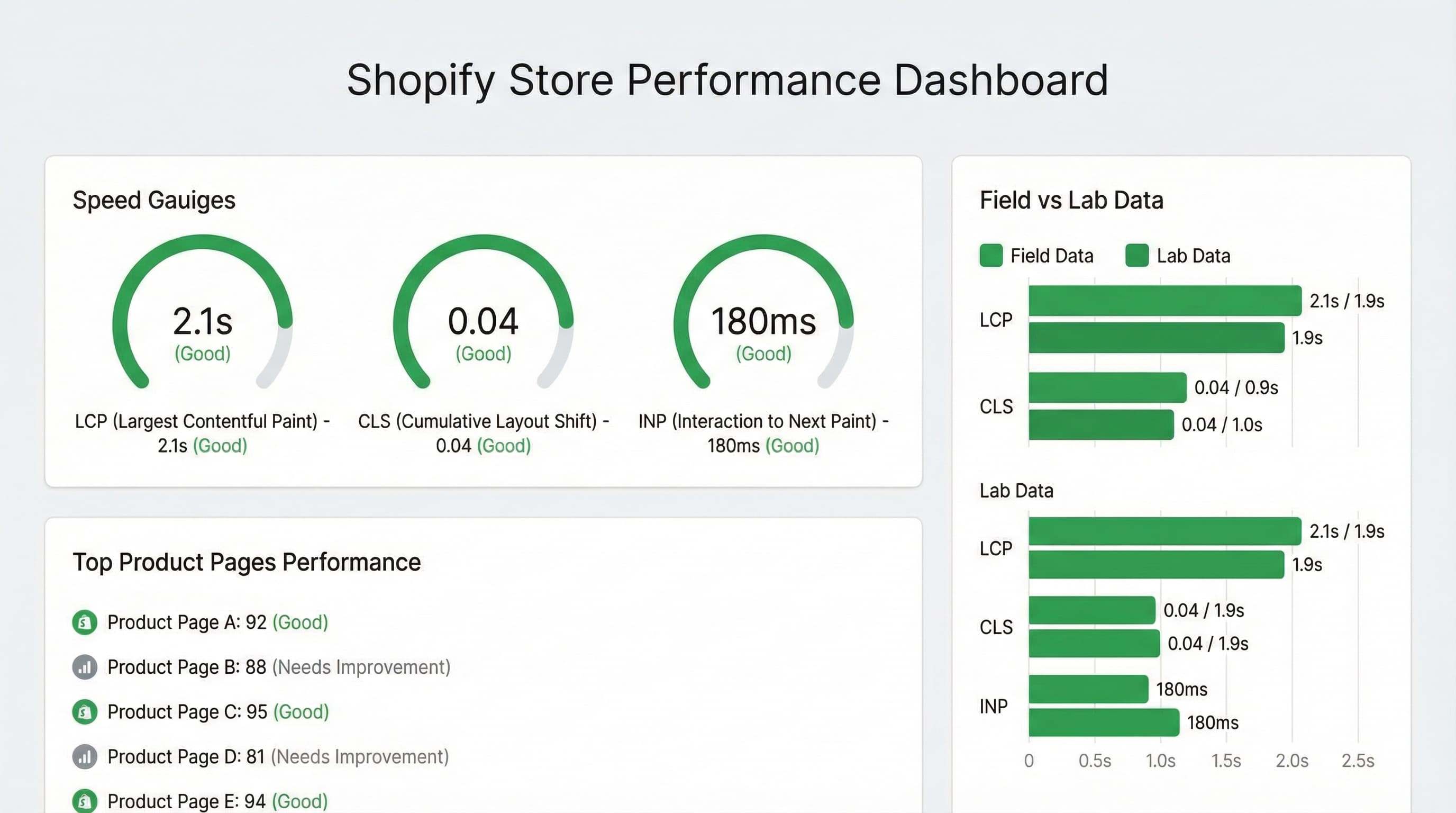
Improving your Shopify store's PDP speed is a tactical priority: it affects both organic visibility and direct conversion. Below is a practical diagnosis to understand LCP, CLS, and INP, and differentiate between lab and field data.
In Shopify, the levers with the highest return are usually the PDP main image and the initial interaction.
LCP (Largest Contentful Paint): Measures the time until the largest visual element visible on screen is painted. In 90% of eCommerce cases, this is the main image.
theme.liquid.CLS (Cumulative Layout Shift): Measures visual instability during loading and prevents jumps that break user trust.
aspect-ratio in CSS) for the main image and price blocks. Avoid injecting asynchronous content (banners, reviews) without a fixed-height container. Metafields can specify exact dimensions to avoid reflows.INP (Interaction to Next Paint): Replaces FID and measures real interaction latency.
Lab tools emulate loads in controlled conditions, while CrUX (Chrome User Experience Report) reflects what your real users experience.
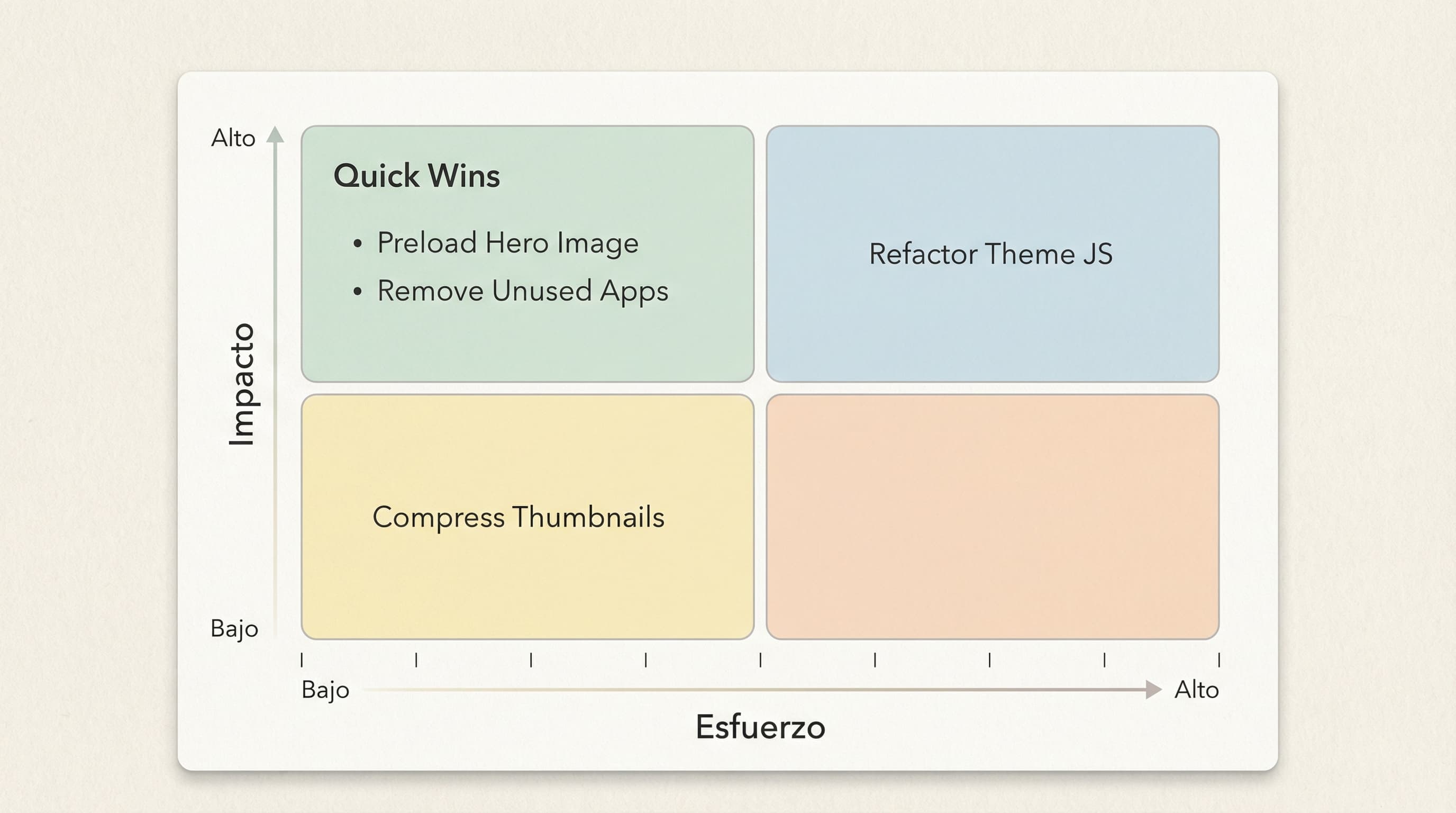
Optimizing the PDP hero usually offers the best LCP reduction with a favorable effort/impact ratio. Before refactoring all JavaScript, act on the main image following this technical checklist.
The goal is to avoid wasting time optimizing secondary resources. Run PageSpeed Insights on a typical product URL and check the resource marked as "Largest Contentful Paint".
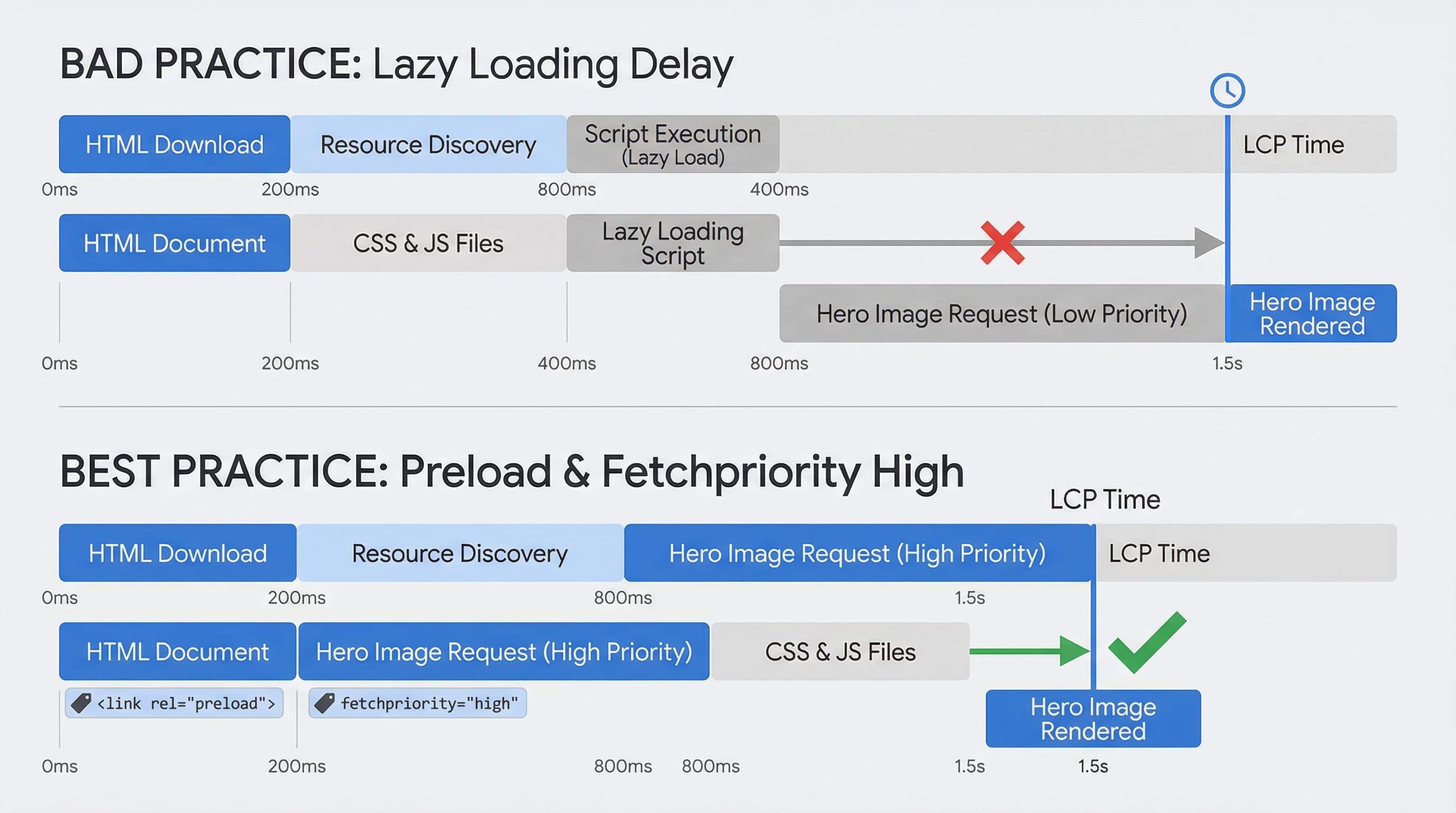
Lazy loading defers image downloading, which is excellent for the footer but disastrous for LCP. In the product template (product.liquid or JSON templates), remove the loading="lazy" attribute from the hero <img> tag. Keep it only for secondary thumbs and slides.
<img loading="lazy"> to <img> on the main image.Force early download to reduce the time until the browser paints the large image. Insert <link rel="preload" as="image"> with the exact URL in the <head>, or better yet, use the fetchpriority="high" attribute directly on the <img> tag if your theme supports it.
<img src="..." fetchpriority="high" alt="...">img tag.Delivering the optimal resolution and formats like WebP drastically reduces weight (bytes) and accelerates LCP. Use srcset and sizes with versions generated by the Shopify Image API to request the appropriate width and format.
{{ product.featured_image | image_url: width: 800 | image_tag: widths: '400, 600, 800', sizes: '(min-width: 768px) 50vw, 100vw' }}Reducing bytes and leveraging cache accelerates downloads and improves recurrent experience. Generate compressed images or request WebP via CDN. Check cache-control headers and avoid dynamic transformations on every request (like random timestamps) that break CDN caching.
Optimizing a Shopify store's speed also implies dependency management. Excess third-party code (bloat) competes for bandwidth and the browser's main thread, degrading both LCP and INP.
Many apps inject code (snippets) into theme.liquid that loads on all pages, even if the app is only used in the cart or specific collections.
Marketing scripts (Meta Pixel, Klaviyo, Hotjar) usually execute with high priority and can be render-blocking.
theme.liquid. Measure CPU time and bytes. Mark non-critical ones to load lazily (defer or async).DOM Ready event or after the first interaction on the PDP, instead of blocking the initial load.Critical CSS for the PDP (main image, title, price) must load as soon as possible.
In catalogs with thousands of references, optimizing a single sheet isn't enough: processes must be institutionalized to protect PDP LCP and prevent regressions when scaling or updating the theme.
Monitoring reveals trends and regressions in real-time (for example, after installing a new app). Combine synthetic monitoring with RUM data visible in Search Console.
Maintaining consistency in titles, descriptions, technical attributes, and image optimization across dynamic catalogs is a task consuming massive resources from content and SEO teams.
ButterflAI detects improvement opportunities in your catalog and automates listing optimization. From generating structured metafields that improve technical SEO to enhancing descriptions and attributes impacting conversion, ButterflAI allows scaling content quality without increasing the team's operational load, ensuring every PDP is optimized for both search engines and users.