Product videos ready in minutes

    Turn product images into high-performing videos for ads and PDPs without editing timelines.

    Free Trial

    E-commerce brands that already trust us

    Official logo of Balteus, a ButterflAI customer brand
    Official logo of Papira, a ButterflAI customer brand
    Official logo of Vinkova, a ButterflAI customer brand
    Official logo of Samo, a ButterflAI customer brand
    Official logo of Quelton, a ButterflAI customer brand
    Official logo of Masco beauty, a ButterflAI customer brand
    Official logo of Tostado, a ButterflAI customer brand

    How video generation works

    From product assets to channel-ready video in three focused steps.

    Step 1

    Select product assets

    Choose product images, lifestyle shots, or short clips. ButterflAI automatically sequences frames, preserves product details, and prepares the timeline for clean cuts.

    Step 2

    Apply brand styling

    Set templates, copy overlays, pacing, and transitions. The system keeps typography, colors, and layout rules consistent across every SKU.

    Step 3

    Export and publish

    Generate multiple durations and aspect ratios in one run. Export for ads, PDPs, and social, then publish or download in bulk.

    3D & cinematic product animations

    Create premium-looking 3D spins and cinematic shots that make products feel tangible.

    Animation workflows built for consistency

    • Generate 3D spins / turntables and subtle 3D depth for hero products
    • Add dynamic callouts (ingredients, materials, key specs) synced to the scene
    • Produce variant videos automatically (sizes, colors, packs) without manual editing
    • Render clean packs for PDP galleries, ads, and marketplaces in one click
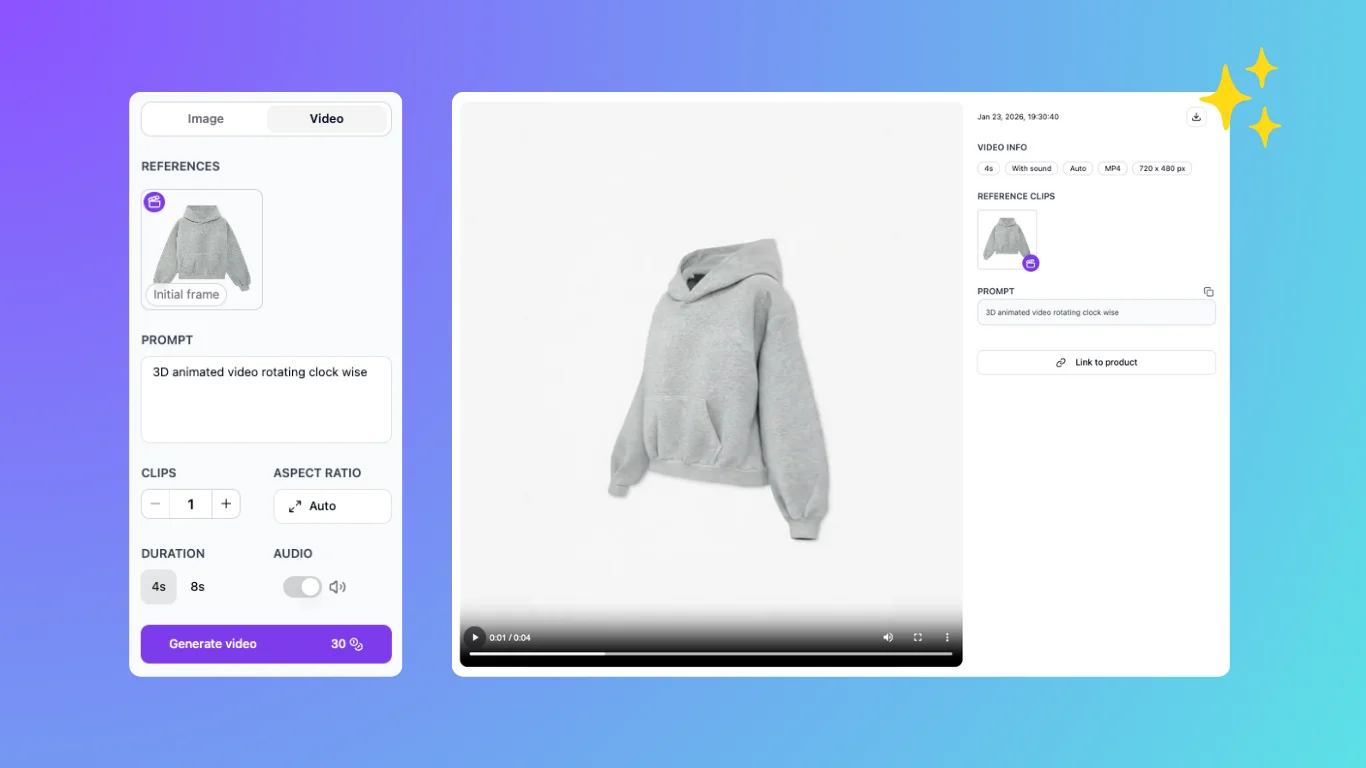
    Storyboard view for product video

    Auto-generate variant videos

    One template, hundreds of SKUs. Show color/size/bundle differences instantly.

    Workflows built for scale

    • Create one master layout and generate a video per variant automatically
    • Highlight what changes (color, size, pack, material) without re-editing
    • Keep visuals consistent across the whole catalog
    • Export clean packs for PDP galleries and marketplaces

    Key features for video teams

    Template library

    Keep layouts consistent across every clip with templates tuned for ads, PDPs, and social hooks.

    Asset library

    Reuse product shots, approved b-roll, and brand elements to avoid rebuilding sequences from scratch.

    Subtitle automation

    Auto captions and benefit callouts that stay on-brand and readable on mobile-first placements.

    Approval workflow

    Review, compare, and publish only approved outputs while keeping version history per SKU.

    Customer story

    We shipped video variants for every SKU in days, not weeks.
    Aina Costa · Balteus
    Read the Balteus case study
    Balteus logo

    Product video FAQs

    Answers to common questions about AI video generation.

    What kind of videos can I generate?
    You can generate short-form product videos for PDPs, ads, and social, including 3D spins, slideshow sequences, or cinematic cuts. Use templates for hooks and feature callouts, then export multiple durations and placements.
    Do I need video editing skills?
    No. ButterflAI handles sequencing, pacing, transitions, and exports for you. You choose assets and a template, then review and approve outputs without a timeline editor or manual keyframing. You can still fine-tune copy and order, but the heavy lifting is automated.
    Can I use my existing images?
    Yes. Start from product images, lifestyle shots, or short clips. The system builds a clean timeline, preserves product details, and creates consistent cuts across all SKUs. You can mix asset types and set ordering rules so the story stays consistent.
    How long does it take to generate a batch?
    Most batches generate in minutes, depending on video length, resolution, and the number of variants. You can queue large catalogs, keep working, and review outputs as they finish. We also support priority queues for time-sensitive launches.
    Can I customize branding?
    Yes. Apply brand colors, fonts, tone, and overlays with reusable templates. Lock layout rules so every video follows the same look and feel across product lines and markets. Teams can save multiple brand kits for regions or sub-brands.
    Are there multiple aspect ratios?
    Yes. Export square, vertical, and horizontal formats in the same run. This lets you publish to PDPs, TikTok, Instagram, YouTube, and marketplaces without re-editing each asset. You can also trim safe areas so text stays readable.
    Can I review before publishing?
    Yes. Each batch includes a review step so your team can approve, reject, or regenerate specific videos. Keep version history per SKU and publish only approved outputs. Approvals can be role-based so only authorized users publish.
    Does it support subtitles?
    Yes. Add automated captions and on-screen benefit callouts tuned for mobile. You can edit copy, timing, and placement to keep readability and brand tone consistent. Captions can be burned in or exported as separate files.
    Can I run A/B tests?
    Yes. Generate multiple variants per SKU with different hooks, pacing, or overlays. Compare performance by channel and keep the best-performing version as your default. Tag variants so results are easy to compare across channels.
    How do I export videos?
    Download in bulk, export organized folders per SKU, or publish to connected channels. You can include multiple aspect ratios and durations with consistent naming to simplify trafficking. Exports can be grouped by campaign or collection.

    Ready to launch video at scale?

    Ship product videos faster and keep every SKU campaign-ready.

    35%
    Higher conversions
    70%
    Less production time
    100+
    Images per minute