
Product Content
How to Create Product Videos for Ecommerce at Scale with AI
A practical playbook to generate product videos at scale using a 5-shot storyboard, AI generators, and a repeatable QA process.
Mar 3, 2026
Read More
Operational playbook to convert Shopify/PIM attributes and metafields into reusable and scalable A+ modules.

Amazon A+ Content is the enriched panel that allows brands to add visual modules and text blocks above the standard description to improve product value communication. It matters because it reduces purchase friction when the listing requires more visual context, trust arguments, or comparisons that do not fit in traditional bullet points.
Increasing conversion with Amazon A+ Content is especially relevant in listings where the purchase decision depends on trust or clear technical specifications.
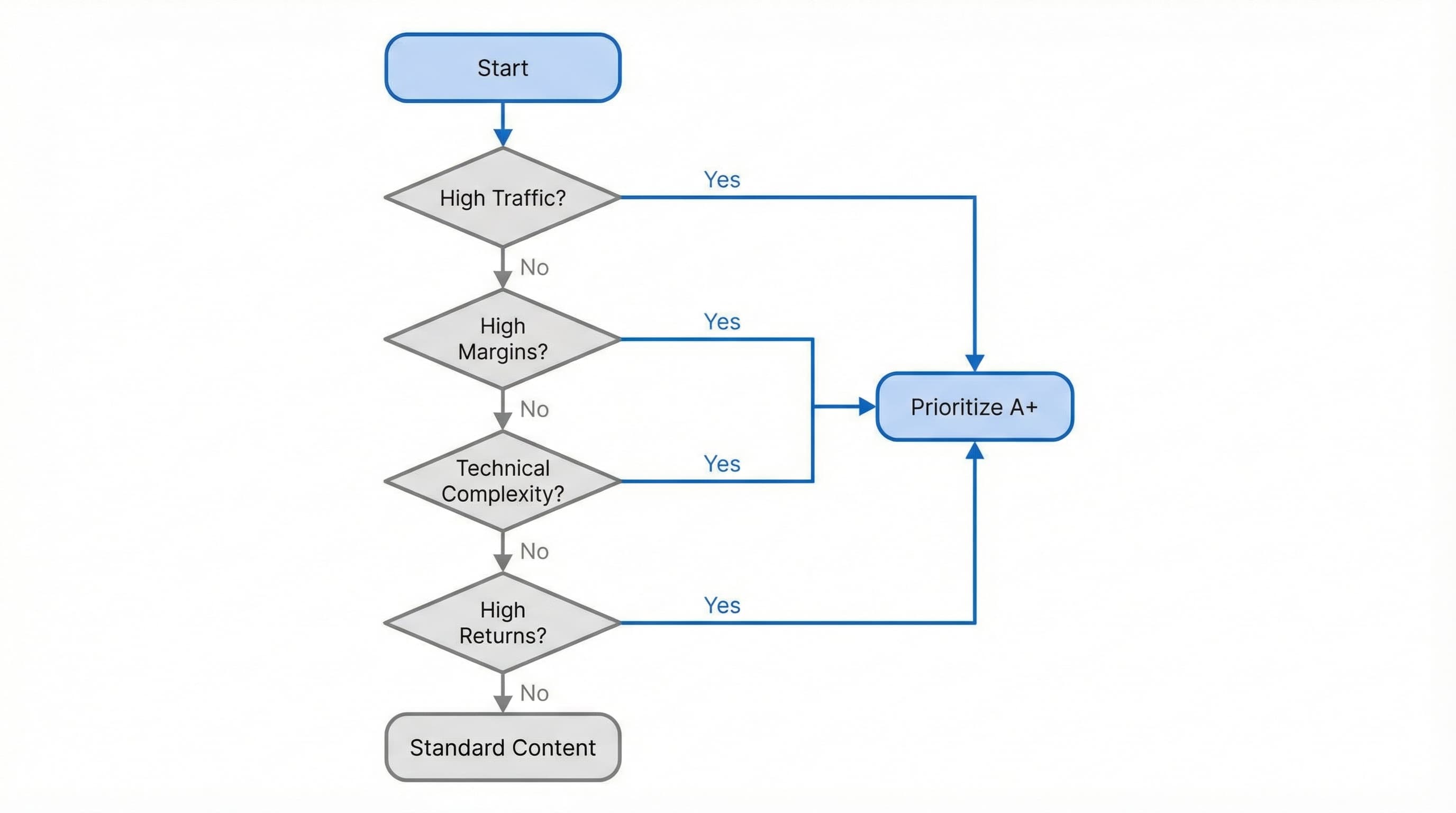
You must assess A+ implementation based on operational ROI. Prioritize these modules on high-traffic or high-margin ASINs, launches needing storytelling, technical categories where spec comparison is decisive, and listings with a high volume of FAQs or returns. Before starting, check the official requirements and formats in Amazon help to verify eligibility and category restrictions.
Practical example: For a range of vacuum cleaners, creating an A+ with three illustrated benefit blocks (power, autonomy, accessories) and a specifications table helps reduce doubts about filter types and spare part compatibility.
Common mistake: Launching A+ en masse across the entire catalog without prioritizing by impact generates immense workload without proportional results and increases the risk of brand inconsistencies.
Having good A+ is not just a graphic design issue; it is a data problem. You need clean and mapped catalog data: titles, bullet points, descriptions, images, technical attributes, and metafields.
Two key concepts come into play here:
How to approach it: Normalize attribute names, verify units of measurement, and define a precise mapping between the catalog field and the specific A+ block. Document validations and copy/creative approval processes before uploading content.
Practical example:
Map the weight field in the PIM to a metafield called weight_grams and dynamically link that field to the "Product Weight" row in the A+ module specifications table for each ASIN.
Common mistake: Copying text directly from the corporate website without reviewing claims. This causes automatic rejections on Amazon for disallowed statements (e.g., "world's best", "lifetime warranty" without disclaimer).
Prioritizing implies establishing governance and creating reusable templates that reduce manual work. Design two or three A+ templates per product family that consume the same catalog fields. Automate filling from the PIM or Shopify metafields to generate consistent and scalable blocks.
Practical example: "Premium Audio" template: includes value proposition in the hero, three benefits with icons, and a technical specifications table automatically fed from metafields.
Common mistake: Not versioning templates. This produces severe brand inconsistencies when claims or lifestyle images are updated in the future.
Amazon A+ Content is the branding piece that allows applying visual coherence and messaging per ASIN when volume grows. This methodology details how to convert attributes and metafields into parameterizable and auditable A+ modules to scale hundreds of listings without losing consistency.
The goal is a canonical data model that feeds parameterized A+ templates. Define key attributes, perform mapping from Shopify or PIM, design a library of reusable modules, generate a structured feed, and automate QA.
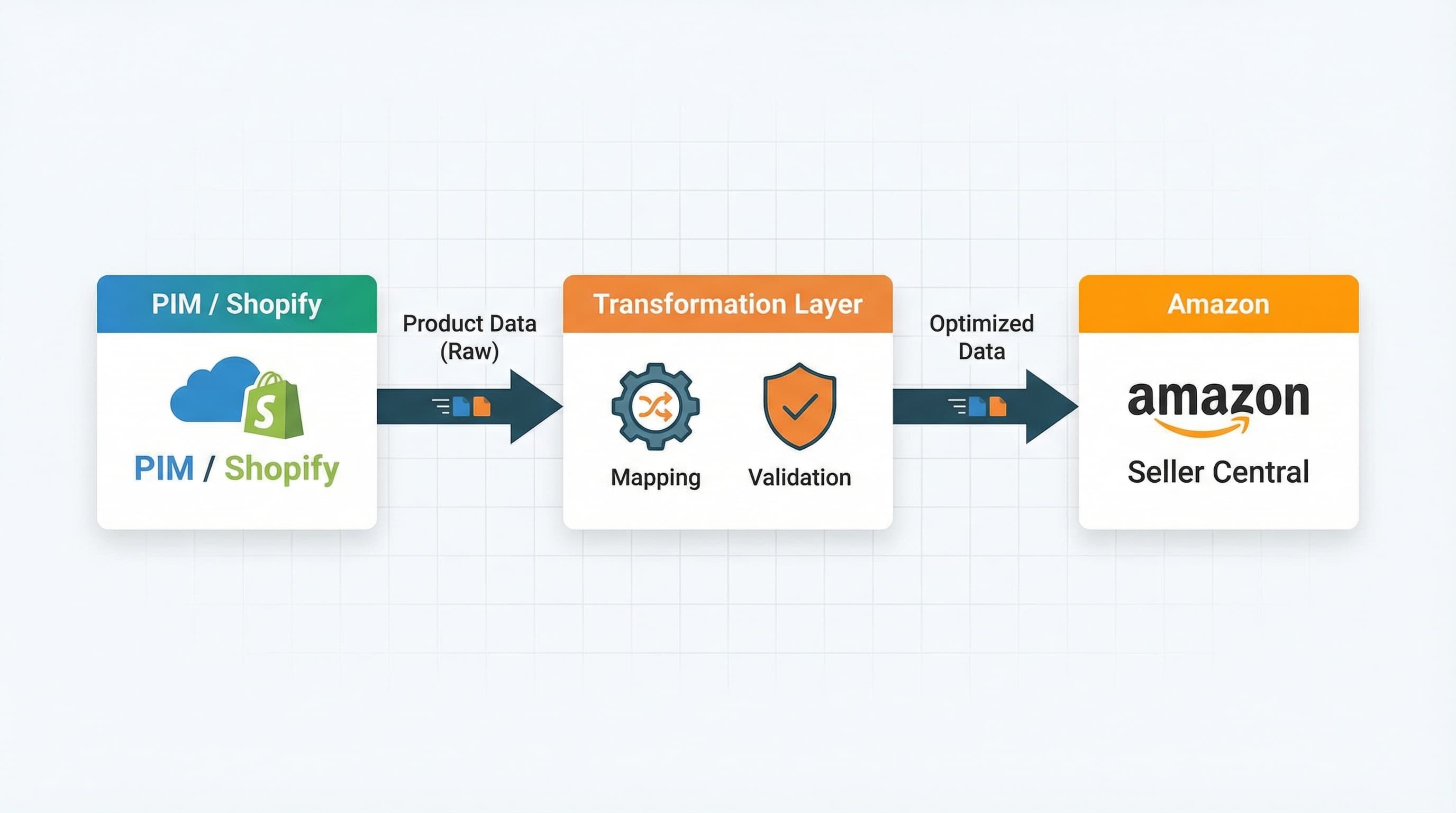
A canonical model avoids inconsistencies between your own store and the Amazon listing, facilitating repeatable transformations.
How to approach it: List necessary attributes by product family and A+ module. Prioritize attributes that impact conversion and on-page SEO, such as key benefits, materials, usage, and dimensions. For each attribute, document the data type, accepted format, length limits, and examples.
Practical example:
Attribute key_benefits: list type of 3 items, maximum length 220 characters per item.
Common mistake: Not establishing a strict format (e.g., allowing HTML in plain text fields), causing truncated content or rejection by Amazon.
Without clear mapping, you cannot automate sending A+ content from the catalog.
How to approach it: Create a mapping table between catalog fields and A+ module fields. Include transformation rules, source priority (when there is a conflict between Shopify and PIM), and fallback rules (what to show if data is missing).
Practical example:
The catalog field metafield.benefits_short maps to the "Main Bullets" module of A+.
Common mistake: Performing mapping without version control, preventing the reversal of mass changes or tracking assignment errors.
Parameterized templates reduce manual work and maintain brand consistency across thousands of SKUs.
How to approach it: Define a library of standardized modules by content type. For example: Hero Image with text, Feature Comparison, and Brand Value Block. For each module, indicate required fields, optional fields, and substitution rules.
Practical example: Hero Image Module: 1500x600 px, title max 60 characters, subtitle 200 characters, and an optional CTA text.
Common mistake: Creating "ad hoc" modules designed for a specific product instead of generic ones, preventing reuse on other ASINs of the same family.
A structured feed allows uploading hundreds of ASINs without manual intervention in Seller Central.
How to approach it: Export a feed (CSV or JSON) from the PIM or Shopify with the canonical model fields already transformed. Include identifiers (ASIN or SKU), version metadata, and date stamp. Ensure necessary transformations like HTML cleaning, unit conversion, and bullet normalization. The feed must strictly comply with Amazon's schema.
Practical example:
CSV with columns: sku, module_hero_image, hero_title, hero_bullets, module_comparison_table.
Common mistake: Sending images with incorrect resolution or format (e.g., CMYK instead of RGB), causing complete module rejection.
Automatic validation reduces rejections and maintains brand quality at scale.
How to approach it: Implement automatic checks for lengths, presence of required fields, image format, contrast, and bullet uniqueness. Classify errors by impact (critical vs. warning) and automate notifications to the catalog team.
Practical example:
Rule: If hero_title > 60 characters -> Critical Error (Do not upload).
Common mistake: Relying solely on visual manual review for high volumes of products.
Without governance, teams introduce subjective variations that break consistency and complicate support.
How to approach it: Define roles, ownership, and approval processes per template. Version templates and maintain a change history. Automate batch deployments using scheduled jobs and use catalog metadata to control exclusions and regionalization.
Practical example: Flow: Draft in PIM -> Execute transformation -> Launch test feed -> Verify in staging environment -> Schedule production upload.
Common mistake: Not versioning templates or maintaining change history, making rollback and auditing difficult in case of error.
Amazon A+ Content must coexist with the technical fields that actually drive discoverability. In this operational playbook, the rule is simple: optimize backend keywords and bullet points for search coverage, and use A+ to convince and reduce conversion friction.
Each field has a different role in visibility and conversion.
Practical example:
Common mistake: Using A+ for keyword stuffing instead of optimizing native search fields.
This is key to scaling without inconsistencies. Extract relevant attributes, normalize values, and map to bullet templates and backend lists.
Practical example:
Attribute material (e.g., "Organic Cotton"): generate backend variants like alternative terms ("bio cotton", "eco clothing") and a visible bullet highlighting the material benefit (softness, sustainability).
Common mistake: Dumping long, commercial PIM descriptions directly into Amazon's backend without cleaning or deduplication.
Controlling quality avoids inconsistencies that penalize conversions. Implement automatic rules: maximum backend length, no repeating exact words in bullets and backend (to save space), and a checklist validating that A+ claims are supported by technical attributes.
Practical example: Automated checklist: Backend length < 250 bytes, bullets focused on benefits, images aligned with claims, PIM fields mapped correctly. To dive deeper into backend strategy, review this Helium 10 technical guide.
Common mistake: Approving a visually attractive A+ without checking that bullets and backend contain the necessary search keywords for the user to reach it.
This is the final operation for teams publishing A+ Content who must avoid brand inconsistencies. We establish review protocols, image management, and metrics to validate changes.
Avoiding rejections and brand consistency failures reduces rework and legal risks. Create a checklist that can run automatically or manually before upload. Includes validations for text length, prohibited claims, bullet alignment, mandatory fields, and correspondence between metafields and modules.
Practical example: Automated rule that blocks descriptions longer than 1000 characters or detects prohibited words (e.g., "medicinal", "cure").
Common mistake: Accepting manual uploads without key field validation, trusting the operator's individual judgment.

Inconsistent images break the brand experience and delay approvals. Define image templates per A+ module with dimensions, order, and accepted types. Maintain a versioned asset repository in the PIM or DAM (Digital Asset Management) and tag usage rights and destination channel.
Practical example: Template for "Comparison Module": requires four 1000x1000 px lifestyle images and two comparison tables in PNG optimized for mobile.
Common mistake: Uploading JPG files with embedded (pixelated) text instead of using Amazon's native text overlay or vector images rendered at high resolution.
Deploying A+ at scale requires traceability and safe rollback capability. Register versions per ASIN with source metadata, template, language, and author. Automate batch deployments from PIM to Seller Central via feeds or API.
Practical example: Batch deployment: "Batch Q3_Headphones_EN" with 200 ASINs, multi-language template v2.1, date log, and responsible author.
Common mistake: Publishing direct changes in Seller Central ("hotfix") without synchronizing the data in the PIM, breaking the single source of truth.
Defining clear indicators avoids decisions based on feelings. Define KPIs for visibility, conversion, and quality.
Practical example: Compare impressions and conversion rate 30 days before and 30 days after publishing the new A+. If a set of ASINs shows consistent improvements, mark the template as "Validated" for mass replication.
Common mistake: Measuring only gross sales without normalizing for seasonality or advertising investment (PPC).
Manual management of hundreds of A+ modules, metafield mapping, and brand consistency review are bottlenecks slowing growth on Amazon.
ButterflAI simplifies this process by connecting directly to your catalog (Shopify, PIM). ButterflAI detects technical attributes and key benefits of your products and automatically generates optimized A+ Content modules, including persuasive copywriting and comparison table structuring, ready to sync with Amazon without format errors or data inconsistencies.
Go deeper with guides and tools connected to this topic.
Quick answers to common questions.
A practical playbook to generate product videos at scale using a 5-shot storyboard, AI generators, and a repeatable QA process.
Mar 3, 2026

Move beyond static images. Learn how to treat sizing as structured data to reduce returns, improve PDP conversion, and scale your catalog operations.
Feb 11, 2026

Technical and operational guide to master structured data markup, improve CTR, and scale your UGC without penalizing load speed.
Feb 3, 2026
