
Product Content
How to Create Product Videos for Ecommerce at Scale with AI
A practical playbook to generate product videos at scale using a 5-shot storyboard, AI generators, and a repeatable QA process.
Mar 3, 2026
Read More
Master your Shopify category SEO with a content strategy, technical architecture, and smart scaling.

Collection SEO is the highest-impact lever for Shopify stores with medium to large catalogs. These pages capture commercial and long-tail queries that group multiple related products, often generating more traffic and better conversions than isolated product pages. Optimizing collections increases organic visibility and distributes internal authority to your best-performing products.
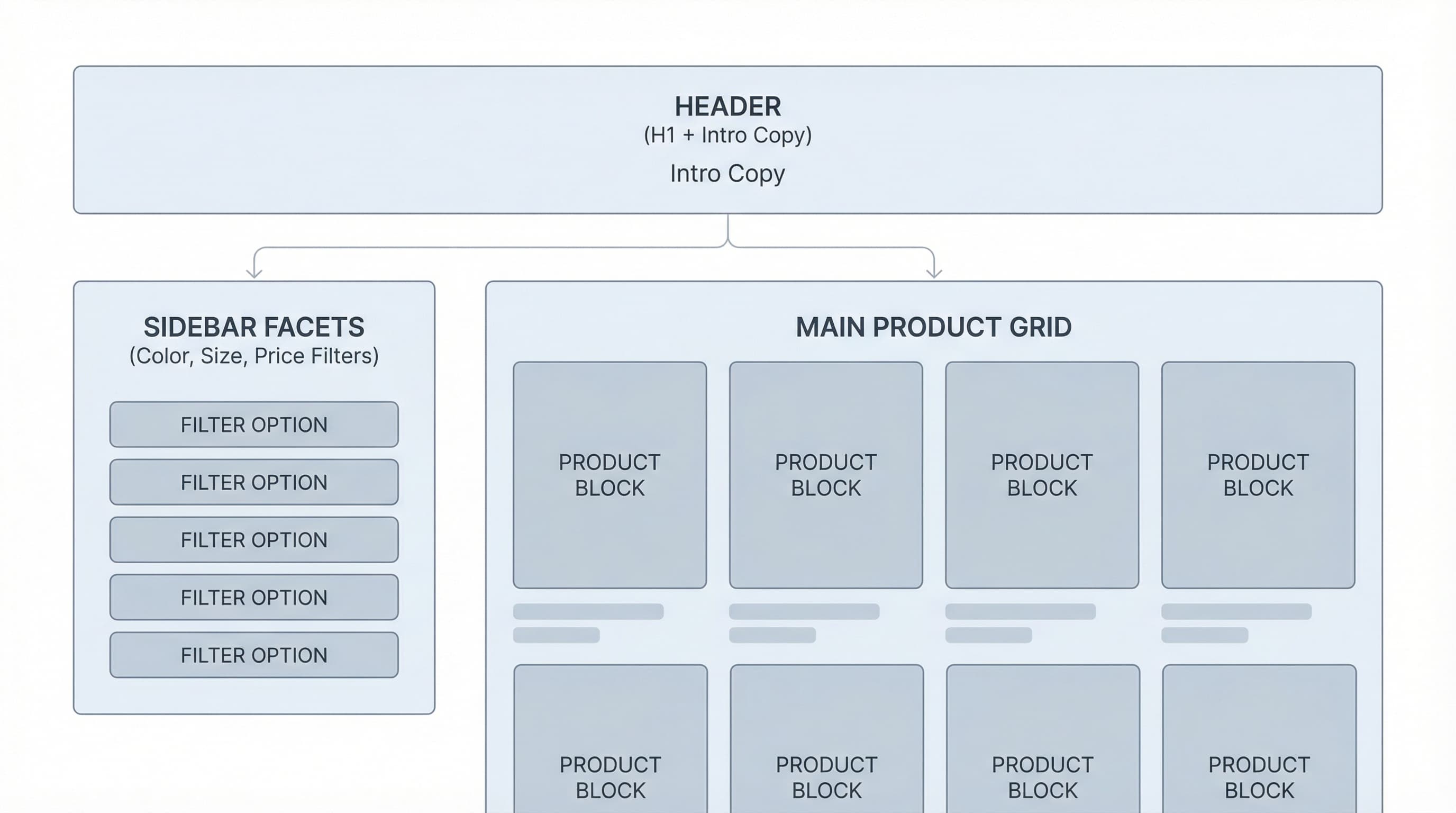
Collections function as thematic landing pages that respond to user intent based on usage, style, or need. They allow for optimized titles, descriptions, and rich elements (FAQs, comparisons) that capture higher-volume keywords.
Key Concepts:
Without control, filtered combinations generate duplicate URLs and thin content.
How to approach it: Prioritize indexing 20 key collections based on intent and business value, apply canonical or noindex rules for combinations, and configure parameters in Search Console.
Brief example: Mark pagination as noindex and canonicalize to the first page of the collection.
Typical error: Allowing all color and size combinations to be indexed, creating thousands of low-value URLs.
For practical guides and references, consult the official Shopify help on SEO and Google's documentation on duplicate URLs.
A quick Shopify collection SEO audit detects barriers preventing category pages from ranking and turns findings into operational tasks. In this practical playbook, you will find how to prioritize, identify thin content and cannibalization, and what minimum data you need before scaling with AI.

Why prioritizing matters Not all collections contribute equally. Prioritizing reduces effort and maximizes impact on traffic and sales.
How to do it Extract collection URLs from Shopify and cross-reference with Search Console and analytics to mark collections with impressions but low interaction. Group by estimated average ticket and number of SKUs. Create a high, medium, and low priority list.
Brief example Collection with impressions and few interactions = high priority for content review and internal linking. Typical error Trying to optimize all collections without business criteria.
Why it matters Collections without useful descriptions do not compete in results and offer little signal to search engines.
How to approach it Filter collections where the visible content zone has fewer than 160-200 words and check if templates insert repeated text. Use Search Console to see URLs with impressions but no clicks and prioritize their rewriting.
Example A collection showing only the title and product list needs a description explaining the search intent. Typical error Pasting generic text blocks that add neither attributes nor intent.
Why it matters Multiple collections competing for the same query dilute authority and confuse crawlers.
How to approach it Extract queries from Search Console, assign one target keyword per collection, and adjust titles, H1s, and internal linking to clarify intent. Consider consolidating or redirecting collections that duplicate intent.
Example Two similar collections for the same segment must be differentiated by audience or usage. Typical error Editing only meta titles without touching the content or linking between collections.
Why it is useful Without basic data, you cannot apply SEO or automate without the risk of creating thin content.
What to include
Typical error Optimizing only the meta title and forgetting the visible description and product data.
Final recommendation Document findings in a sheet by priority, attach SERP examples, and consult guides on canonical tags and pagination in Shopify, such as the one from Codersy
Converting collections into ranking pages requires architecture, content, and technical control. This operational playbook for Shopify collection SEO offers concrete steps to hierarchize categories, optimize meta tags, control facets and pagination, and scale descriptions without generating thin content.
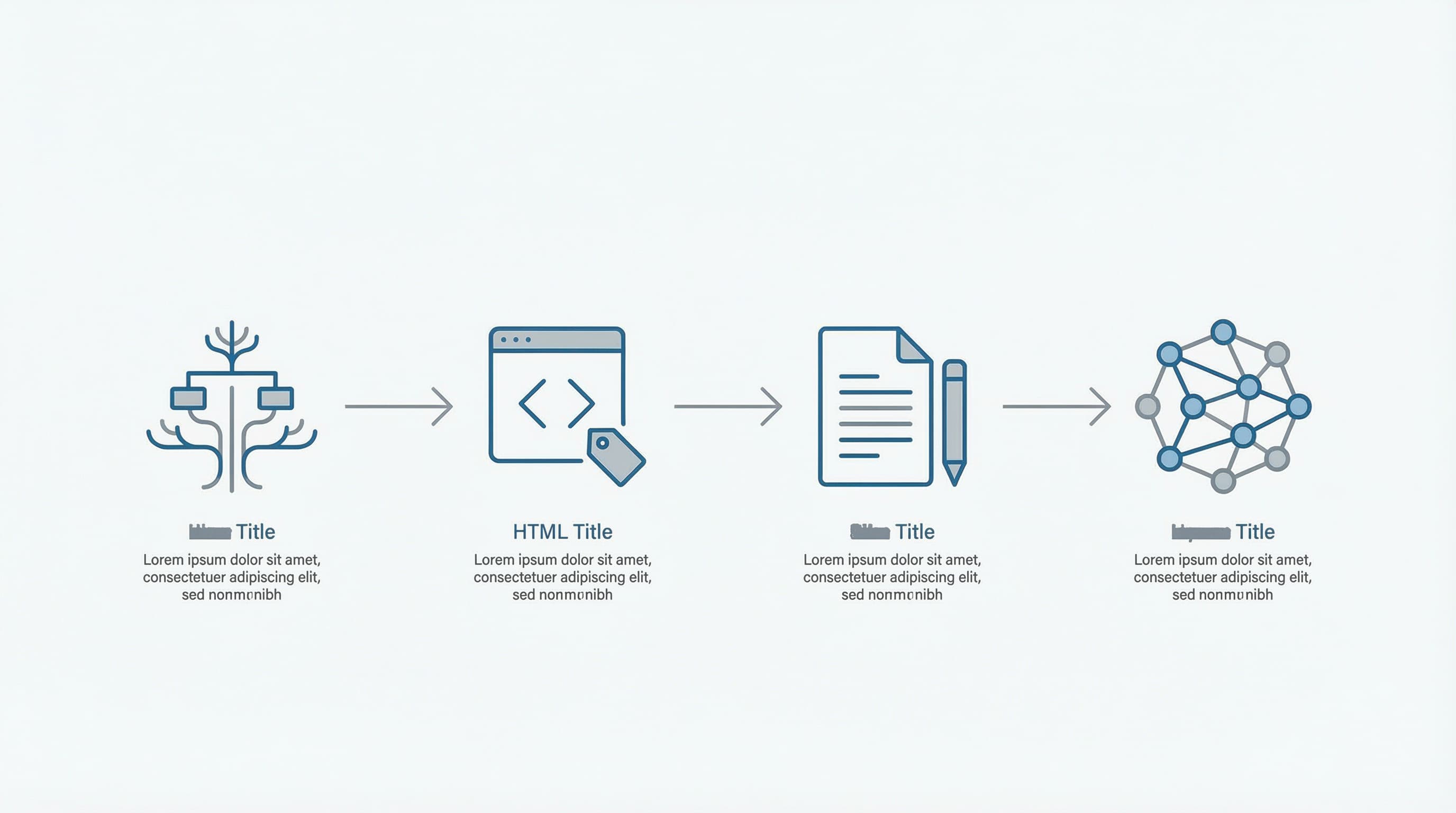
Why this step matters The category structure helps search engines understand priorities and prevents cannibalization.
How to approach it Define clear levels from the main category to subcategories based on search intent and business data. Implement visible breadcrumbs for users and crawlers. Breadcrumbs are a navigation scheme showing the path from home to the collection, aiding hierarchy understanding.
Example Top category Sneakers › Running Sneakers › Trail Running Sneakers. Typical error Flat collections without priorities or links from the main navigation.
Why this step matters Well-designed Meta title, meta description, and H1 increase relevance and CTR for transactional and informational queries.
How to approach it Create meta title and meta description templates that use metafield variables to inject brand, type, and season. Shopify Metafields allow dynamic templates in the store.
Example Title template: Type Brand Season | Running Sneakers Brand Name Online Store. Typical error Identical automatic titles across multiple collections generating duplicates. Useful link Metafields documentation
Why this step matters Filters and paginated pages create multiple URLs that can disperse authority and cause duplication.
How to approach it
Apply rel="canonical" when pagination does not add unique content and avoid indexing irrelevant parameters. Implement canonicals from the collection template and review robots rules for non-useful parameters.
Example The URL for collection page 2 canonical points to page 1. Typical error Indexing all filter combinations and losing ranking strength. Useful link Shopify Pagination Guide
Why this step matters Content aligned with intent avoids thin content and improves CTR and conversion.
How to approach it Define three copy templates by intent: transactional, comparative, and informational. Use a PIM to centralize attributes and feed templates. Always add 1 or 2 unique paragraphs per collection using metafields for differential attributes like material or availability.
Example Transactional intent: two lines with key benefits and a brief call to action. Typical error Repeating the same description across hundreds of collections.
Why this step matters Internal linking guides crawlers and distributes authority to priority collections.
How to approach it Link from product pages to their main collection and create blocks of related collections. Add schema for breadcrumbs so search engines recognize the structure.
Example Link on Trail Sneakers product page pointing to Trail Sneakers collection. Typical error Scattered links without criteria that do not guide the crawler.
Why this step matters Automation speeds up production, but without rules, it can generate unhelpful descriptions.
How to approach it Use generation tools to create drafts and variations but apply quality rules: force the addition of at least one unique phrase per collection, validate minimum length and presence of attributes, and perform sampling checks before mass publishing.
Example Generated draft: Add a phrase about material availability from metafield. Typical error Publishing mass-generated descriptions without validation.
Internal linking is the lever that allows collections to compete for difficult terms. In Shopify, you must design an architecture that distributes authority, guides the user, and reduces paths that generate duplicate content.
Context: Without a defined authority flow, priority collections do not scale in competitive searches.
How to approach it: Define a reduced set of target collections and prioritize links from the header, product pages, and attribute landings. Use descriptive anchor text and avoid excessive links in the header that dilute the signal.
Example: Link from the running sneaker product page to the running sneakers collection using anchor text that includes the main attribute. Typical error: Treating all collections as equal and not prioritizing links from high PageRank areas.
Context: Breadcrumbs indicate the user's position within the site hierarchy and send context signals to search engines.
How to approach it: Implement breadcrumbs reflecting the real catalog structure and add breadcrumb structured data to improve Google's interpretation. Check the official guide on breadcrumbs for implementation.
Example: Home - Men - Footwear - Running Sneakers. Typical error: Using breadcrumbs that do not match the main navigation and confuse users and engines.
Context: Headers and footers channel authority to priority collections.
How to approach it: Limit to a reduced set of visible global links and reserve space for strategic collections. Use descriptive anchor text including relevant terms or attributes when it adds semantic context.
Example: Header link with anchor "running sneakers" pointing to the main collection. Typical error: Multiplying global links and diluting the signal toward key pages.
Context: Attributes like material, size, and color allow creating thematic paths that reinforce relevance.
How to approach it: Generate intermediate landings for priority attributes and link from product pages, filters, and related blog posts. In Shopify, metafields facilitate storing extra attributes and activating landings or dynamic content blocks.
Example: From a sneaker page, link to the EVA material landing with content explaining the material's advantages. Typical error: Creating landings for every attribute combination and producing thin content.
Context: Faceted navigation and pagination can generate many URLs that dilute authority and create duplication.
How to approach it: Define a clear policy: canonical toward the main collection for non-priority variations and noindex for filter combinations that add no value. Configure parameters in Search Console and consider using rel="prev/next" when pagination adds value. For practical reference on faceted navigation consult Moz
Example: Canonicalize pagination pages to page 1 if they don't provide unique content. Typical error: Indexing all filter combinations without control and losing authority.
Technical concepts in one line: Shopify Metafields is a system to store extra product and collection data allowing for personalized and automated landings. Schema is a structured data format helping engines better understand pages and show rich results.
Collection SEO controls that your category pages attract relevant traffic and convert. In Shopify, facets and filters generate many derived URLs that, without clear rules, scatter crawl budget, create duplicates, and dilute the main collection's authority.
Prioritize indexing the parent page of each collection, canonicalize or apply noindex to low-intent filter variants, clean the sitemap, and control parameters in robots.txt. When scaling content with automation, combine variable templates with manual controls to avoid thin content.
Brief technical note: robots.txt is a file indicating to crawlers which paths not to visit, helping preserve crawl budget. Sitemap is a list of URLs you indicate to search engines as priorities. Canonical is a tag signaling the preferred version of a page when duplicates exist. Liquid is Shopify's template language allowing meta tag injection and rules in templates. rel="prev" and rel="next" are links used in pagination to indicate sequence but do not replace indexing rules.
Context: Facets multiply URL combinations and can create redundant content.
How to approach it: Start by mapping which facets add real SEO value, for example, brand, subcategory, or material. For low-intent facets like sorting, dynamic price range, or availability, prevent them from being indexed. In Shopify, you can manage meta robots from Liquid templates or use an app applying mass rules. Implement canonical toward the main collection when filtering only changes the presentation.
Example: Canonicalize /collections/sneakers?color=red to /collections/sneakers if the filter only modifies visualization.
Typical error: Allowing all filter combinations to be indexed without criteria and without prioritizing pages with organic performance.
Context: Pagination generates sequential pages that engines crawl and can consume crawl budget.
How to approach it: Maintain pagination with clear internal links and decide if pages 2 onwards should be indexed. A common strategy is to include only page 1 of each collection in the sitemap and apply noindex to subsequent pages if they don't add unique content. Do not rely solely on rel="prev" or rel="next" to control indexing. Review robots.txt and sitemaps to avoid exposing thousands of low-quality paths; consult practical guides like the robots guide in ButterflAI for Shopify and sitemap options in the Shopify App Store.
Example: Include only /collections/table-linen in the sitemap and mark /collections/table-linen?page=2 with noindex if the page only repeats products.
Typical error: Leaving all paginated pages indexable and listed in the sitemap.
Context: Deciding what to index is both a strategic and technical decision.
How to approach it: Prioritize collections with real searches and a stable product set. Use canonical for filter variations that don't change intent, apply noindex for session, sorting, or tracking parameters, and block irrelevant parameters in robots.txt or custom sitemap tools. For complex implementations use apps allowing custom sitemaps and bulk rules to align robots, sitemap, and meta robots.
Example: Block tracking parameter paths in robots.txt and noindex URLs with sorting parameters.
Typical error: Applying inconsistent rules between robots, sitemap, and meta robots, creating crawl gaps.
Context: Automating descriptions for thousands of collections is necessary but can produce repetitive content if distinctive variables are missing.
How to approach it: Design templates combining unique variables per collection with specific text blocks by segment and differentiating points. Automate only the structural parts and leave manual reviews for key blocks like the intro or FAQ. Add rich content providing unique value for each collection.
Example: Template injecting collection name, material, and 3 unique bullets extracted from attributes. Typical error: Generating thousands of nearly identical descriptions without attributes distinguishing them.
Sources and reading: Consult the robots guide in ButterflAI and sitemap documentation in the Shopify App Store for practical options and compatible apps.
Shopify Collection SEO requires maintaining unique signals per page to avoid thin content and duplicates when scaling. Here is an operative playbook to create briefs, control prompts, and KPIs allowing quality content generation for hundreds of collections in Shopify without losing coherence or performance.
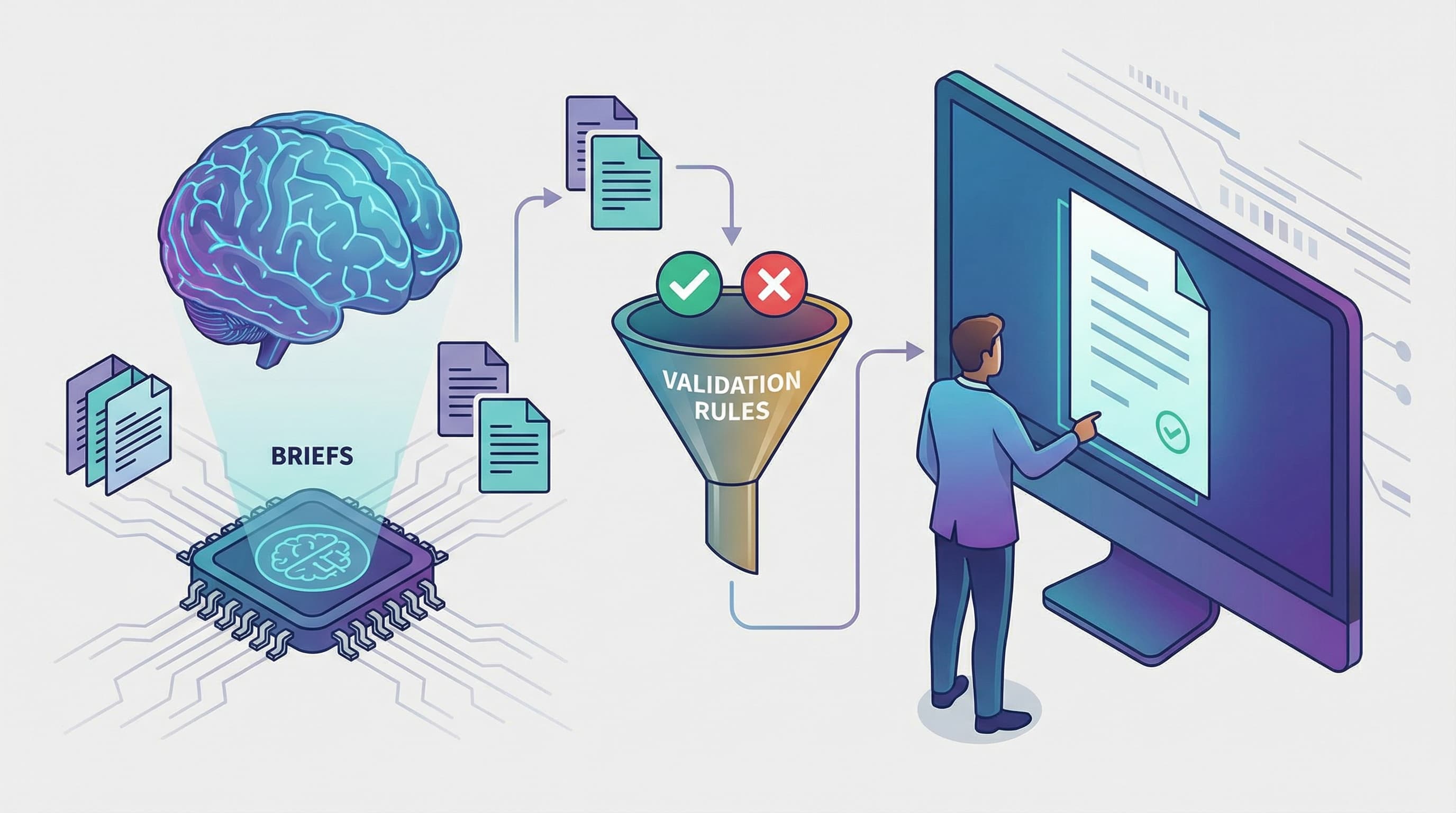
Organizing briefs reduces repetition and gives useful context to the model.
How to do it Design a template with mandatory fields: business objective, target audience, main product of the collection, three differentiating attributes, relevant long-tail keywords, tone, target length, and language restrictions. Include examples of preferred phrases and forbidden phrases to avoid clichés.
Brief example Objective: Improve organic CTR. Attributes: recycled material, 24-hour shipping, 2-year warranty. Long tail: reactive cushioning running sneakers. Result: 150 to 220 words and two benefit bullets.
Typical error Incomplete briefs producing generic texts with no differential value.
Prompts control format, angle, and exclusion rules.
How to approach it Combine generation instructions with automatic validation rules. Ask for lexical variation, mandatory use of unique attributes, and minimum length. After generating, calculate semantic similarity against the collection corpus and reject versions above the threshold.
Brief example Prompt: Generate unique description of 180 words focused on benefit X and using attributes A and B. Validation: Reject if semantic similarity with existing collections is greater than 0.75.
Typical error Trusting only the prompt without automatic validation or control grid.
Facets are filters applied to listings that alter URLs and can create duplicates. Pagination generates sequential pages that must be managed.
How to handle it
Apply rel="canonical" pointing to the canonical version of the collection for low-value filter combinations and mark parameterized URLs that add no value as noindex. Avoid indexing sorting and pagination parameters. Consult Google Search Central documentation on URL consolidation at and Shopify documentation on collection control at .
Brief example
Mark URLs with sorting parameters as noindex and canonicalize toward the main collection without parameters.
Typical error Indexing all filter combinations without canonical or noindex.
Technical note Shopify Metafields are extended fields to store product data allowing content customization and relevance improvement. A PIM is a product information management system centralizing attributes and facilitating channel consistency.
Measuring avoids content degradation when scaling.
How to measure Monitor organic CTR per collection, average position, percentage of collections with unique content, and generation rejection rate due to similarity. Implement sampled manual reviews of 5% monthly and alerts for CTR drops.
Brief example KPIs: CTR per collection, positions, percentage of collections with unique content greater than 90 percent.
Typical error Only looking at aggregated traffic and not detecting collections with performance drops.
Brief FAQ Include an automatic rejection rule for texts with high similarity and a scaling process for manual reviews when rejection exceeds 10 percent of total monthly generations.
Shopify Collection SEO starts by prioritizing collections that already generate traffic or margin. Select a pilot collection and apply iterative improvements in content, technical control, and internal linking to measure impact quickly.
Metafields are custom fields in Shopify allowing structured data addition and content scaling. PIM is a centralized system for managing attributes and maintaining catalog consistency.
Start with a pilot collection, measure traffic and conversion weekly, and adjust according to data. Consult the Shopify guide and our recommendations
Creating and maintaining unique, optimized descriptions for hundreds of collections is a race against time. ButterflAI detects opportunities in your catalog, automates writing with business rules, and ensures the technical integrity of your Shopify collections, freeing your team for strategy.
Go deeper with guides and tools connected to this topic.
Quick answers to common questions.
A practical playbook to generate product videos at scale using a 5-shot storyboard, AI generators, and a repeatable QA process.
Mar 3, 2026

Move beyond static images. Learn how to treat sizing as structured data to reduce returns, improve PDP conversion, and scale your catalog operations.
Feb 11, 2026

Operational playbook to convert Shopify/PIM attributes and metafields into reusable and scalable A+ modules.
Feb 4, 2026
