Article video
Watch on YouTubeHow to Create Product Videos for Ecommerce at Scale with AI
A practical playbook to generate product videos at scale using a 5-shot storyboard, AI generators, and a repeatable QA process.
- eCommerce Catalog Audit: A Quality and SEO Guide with AI
- Building Scalable Ecommerce Product Comparison Tables
- Amazon Listing Optimization at Scale: The Blueprint
Introduction: The Product Video Bottleneck
In the high-stakes world of digital retail, motion has shifted from a luxury to a baseline requirement. According to recent data from Invesp (2024), product pages featuring video content see up to a 65% lift in conversion rates compared to those relying solely on static imagery. Furthermore, incorporating video can reduce return rates by as much as 18% by providing customers with a clearer understanding of fit and functionality before they click buy.
Despite these clear benefits, most eCommerce managers face a significant hurdle: the production bottleneck. Traditional video production is notoriously slow, expensive, and difficult to coordinate across a large catalog. From shipping physical samples to coordinating lighting setups and hiring professional editors, the old-school workflow simply cannot keep pace with the agility of modern D2C brands. This manual approach creates a "one-off" mentality that prevents teams from scaling their content operations.
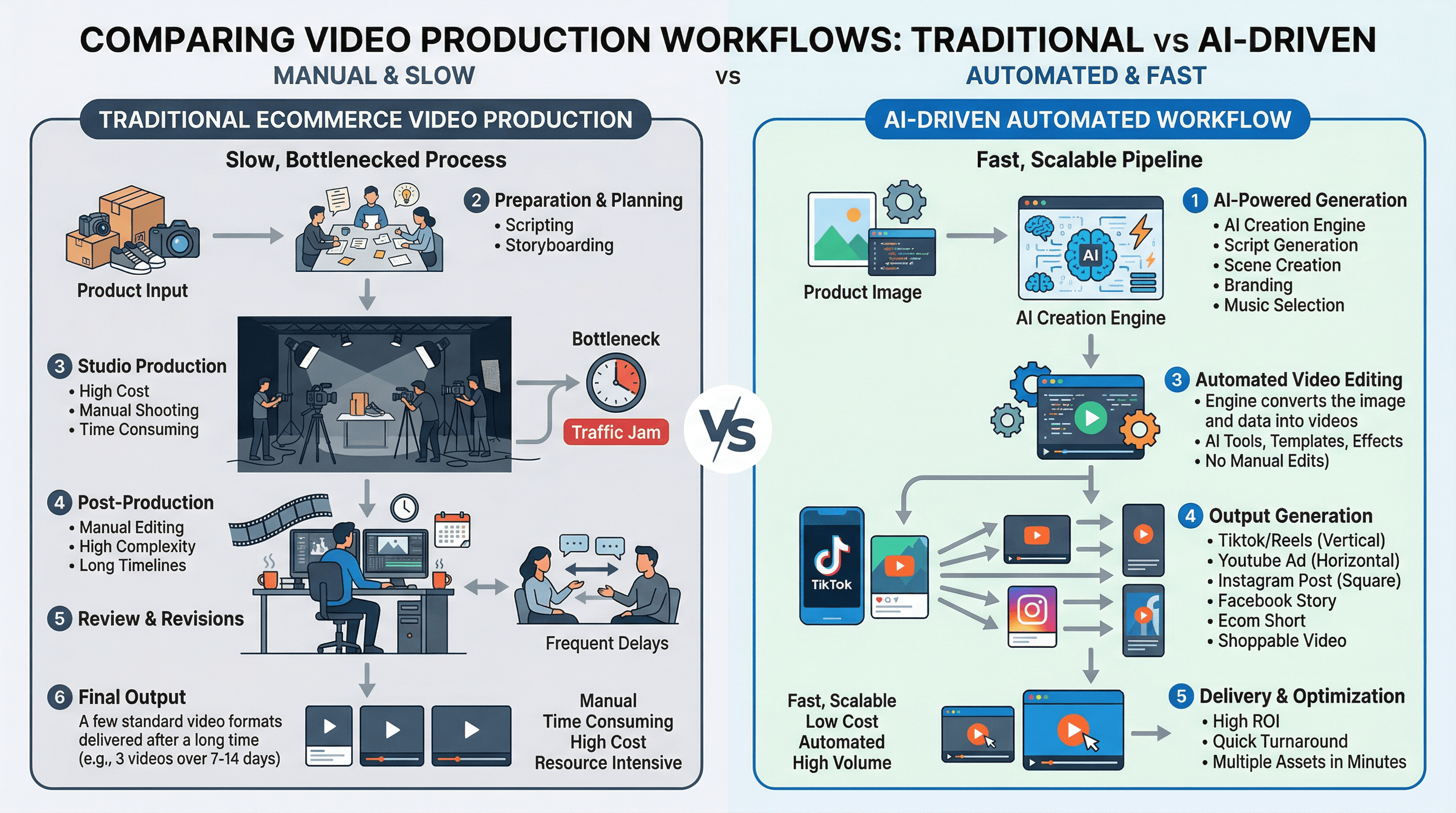
This is where a product video maker AI changes the game. By moving away from custom shoots and toward an automated, template-driven approach, brands can now generate high-quality video assets at scale. The key lies in shifting the focus from individual creativity to a repeatable system. Instead of reinventing the wheel for every SKU, smart teams use a 5-shot scalable storyboard—a framework that ensures consistency across Shopify, Amazon, and social channels.
In this guide, we will explore how to implement an AI-driven video workflow that eliminates the production logjam and turns your product catalog into a high-converting video engine.
Learn more about the current landscape of AI tools for eCommerce growth.
Video Strategy for eCommerce Listings: What to Show, Not Just What to Say
Merely adding motion to a PDP (Product Detail Page) isn't enough. The goal is to address specific customer objections at every stage of the funnel. A product demo video needs to adapt its pacing, messaging, and visual focus depending on where the user encounters it.
Mapping Goals by Funnel Stage and Placement
Understanding the psychology of the buyer at each touchpoint is critical. Videos should not be a "one-size-fits-all" asset. Instead, they must be tailored to the specific channel and user intent:
- Top of Funnel (Ads & Social Media): The primary goal is stopping the scroll. Fast cuts, immediate problem-identification, and clear value propositions are essential. The user does not know your brand yet, so the video must be visually disruptive.
- Middle of Funnel (Marketplaces like Amazon/MercadoLibre): Users are comparing options and looking at multiple tabs. Here, the video must highlight differentiators, exact specifications, and feature proof. They need to know why your product is superior to the one right next to it.
- Bottom of Funnel (Your Shopify PDP): High intent. The user is on your site and needs final validation. Focus on scale, fit, unboxing experiences, and detailed use cases to reduce the risk of returns.
Note on Shopify Metafields: Shopify Metafields allow you to store additional data for products, collections, or variants. By using custom metafields, you can dynamically inject specific video URLs per variant (e.g., showing the red shoe video when the red variant is selected), dramatically improving the relevance of your PDPs without manual coding.
The 5-Shot Scalable Storyboard
To create product videos at scale, you must abandon bespoke scripts in favor of a repeatable framework. The 5-shot storyboard is a proven structure that works across 90% of eCommerce categories:
- The Hook (0:00 - 0:03):
- Purpose: Grab attention immediately.
- Example Format: A split-screen showing the "Before" (problem) and "After" (your product). Or a rapid zoom-in on the product's most striking visual feature.
- The Context (0:03 - 0:08):
- Purpose: Show the product in its natural environment to establish scale and aesthetic.
- Example Format: A lifestyle shot. If selling a coffee maker, show it sitting elegantly on a modern kitchen counter with soft morning light.
- Feature Proof (0:08 - 0:15):
- Purpose: Validate the primary marketing claim.
- Example Format: A macro shot or technical breakdown. If the jacket is waterproof, show water beading and rolling off the fabric in slow motion.
- Use-Case & Lifestyle (0:15 - 0:22):
- Purpose: Help the buyer visualize ownership.
- Example Format: A person interacting with the product easily. For a SaaS tool, a clean UI screen recording of a 1-click action saving time.
- The CTA (0:22 - 0:25):
- Purpose: Drive the next action.
- Example Format: Brand logo, a specific discount code, and a clear directive like "Shop the Spring Collection now."
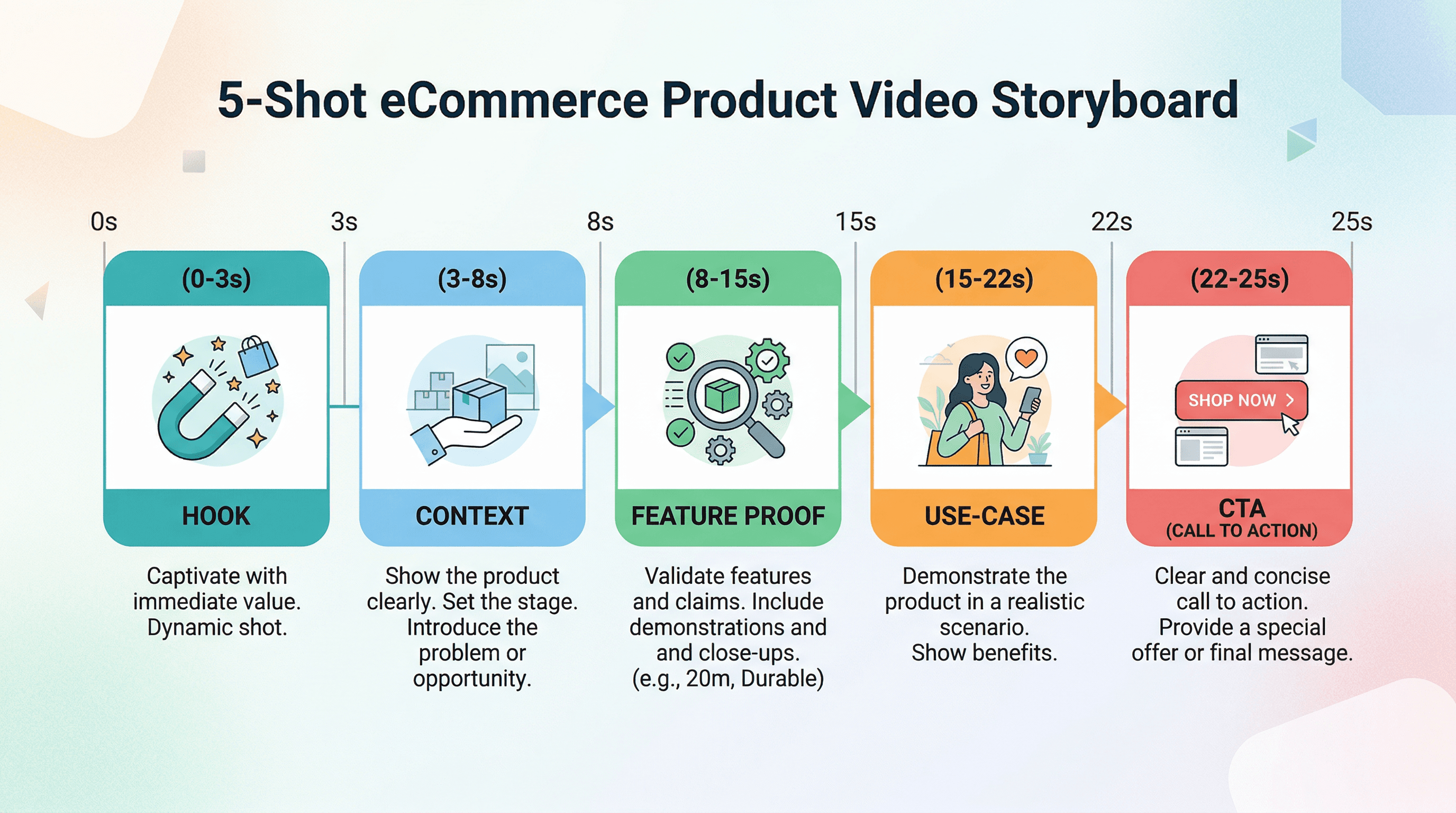
By adhering to this strict 5-shot framework, a product video maker AI can systematically slot in assets, text overlays, and transitions without requiring a human editor to make creative pacing decisions for every single SKU.
Production Workflow to Scale Without a Studio
Transitioning from a manual editing process to an automated engine requires a highly organized input phase. AI tools are incredibly powerful, but they operate on a strict "garbage in, garbage out" principle.
Note on PIM (Product Information Management): A PIM system centralizes all product data (specifications, dimensions, descriptions, and media links), acting as the single source of truth to feed your AI video generator automatically.
Source Asset Checklist for AI Generation
Before triggering any automated video generation, ensure each SKU has the following assets accurately tagged and organized in your database:
- Base Imagery: At least 3 high-resolution static images (Front, Side/Angle, Detail).
- Transparency Layers: Products isolated on a transparent background (PNG or WebP format) for dynamic background replacement.
- Brand Kit: Exact Hex codes, licensed typography files (TTF/OTF), and high-resolution vector logos.
- Data Feed: A structured CSV or XML feed containing the product title, key benefit, current price, and CTA text.
Generating Video Variations Safely
When using AI to generate variations from existing images, you must establish strict business rules to prevent off-brand outputs.
- Naming Conventions: Use a standard, machine-readable structure like
[SKU]_[Channel]_[AspectRatio]_[Language].mp4. Example:SHOE123_IG_9x16_EN.mp4. This prevents catalog mismatches. - Background Generation: Instead of fully open prompts, use constrained styles. For example, instruct the AI to "Place the product on a clean white marble podium with soft top-down lighting" rather than a vague "Make a cool background."
- Asset Versioning: Generate the core video first, then branch out into aspect ratios (16:9, 1:1, 9:16) and localized versions using the exact same visual backbone.
Caption and Overlay Rules
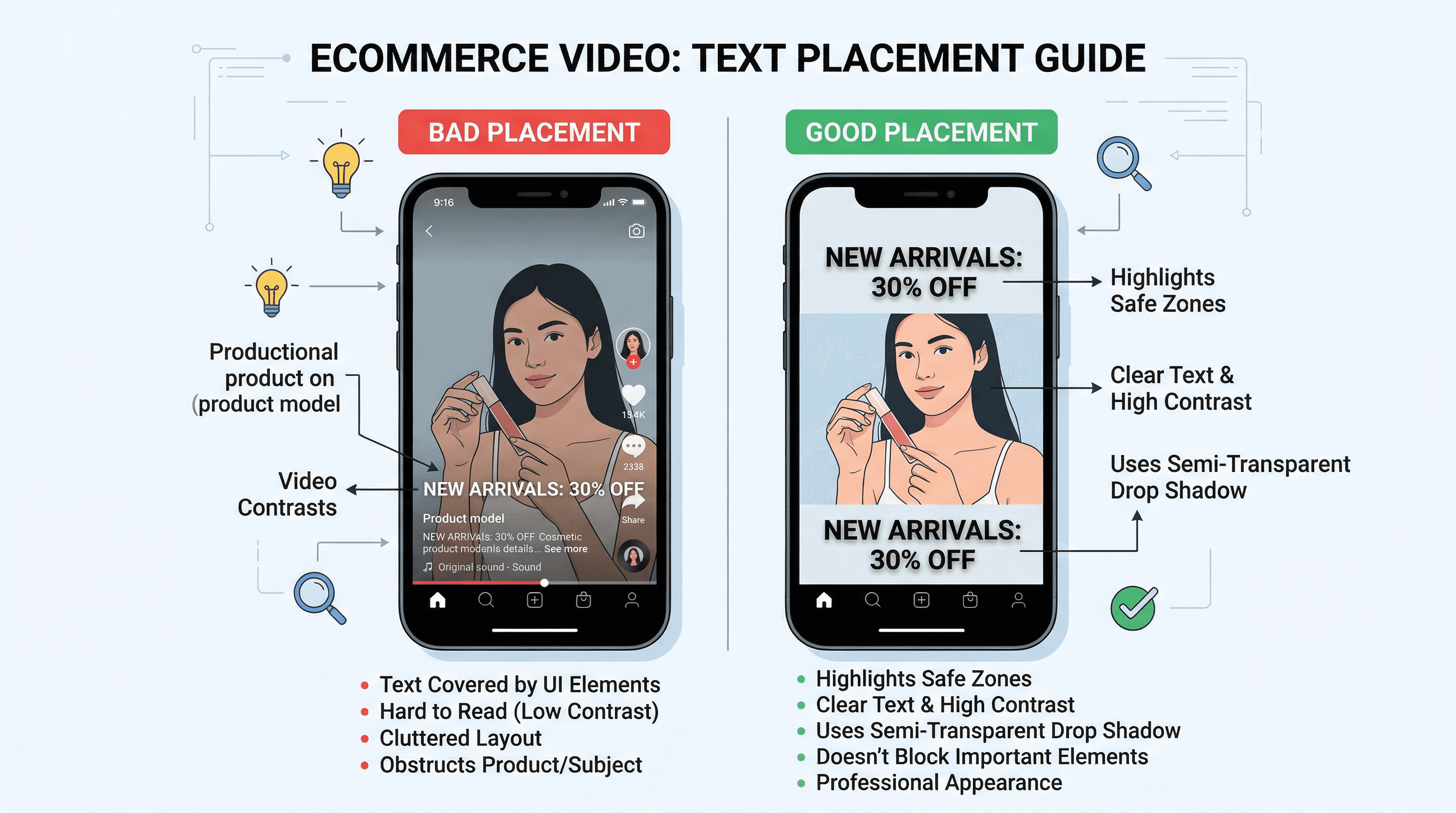
Text overlays are critical, as up to 80% of users watch videos on mute depending on the platform. However, poorly placed text can ruin the aesthetic or get covered by native platform UI (like TikTok buttons or Instagram Reels descriptions).
- Legibility: Always use a subtle drop shadow or a semi-transparent dark banner behind white text. Never place thin text directly over a complex visual background.
- Placement: Keep critical text within the "safe zones" (avoiding the bottom 20% and right 15% of vertical videos).
- Compliance & Localization: Ensure your data feed separates text by language so the AI can render EN, ES, and FR versions simultaneously without manual re-editing. Ensure claims are legally compliant per region.
Quality Assurance & Measurement Loop
Creating thousands of product demo video examples at scale is only valuable if they are accurate and actually drive conversions. A robust QA and measurement loop prevents catalog errors from costing you sales.
The Automated Video QA Checklist
Implement a step-by-step checklist before pushing generated videos live to production:
- Brand Alignment Check: Do the hex codes match exactly? Is the logo correctly proportioned and placed in the top right corner?
- Text & Price Accuracy: Does the price in the video match the current live price in the Shopify feed? (This is absolutely crucial for promotional or seasonal videos).
- Mobile Readability: Can the text be read on a 6-inch mobile screen without squinting?
- Accessibility Standards: Are standard closed captions (VTT files) generated and attached for screen readers and accessibility compliance?
- Format & Aspect Validation: Are the aspect ratios correct? (16:9 for YouTube/Desktop PDP, 1:1 for Instagram/Facebook carousel ads, 9:16 for Reels/TikTok/Mobile PDP).
A/B Testing Plan for Continuous Improvement
Do not test everything at once. This creates messy data. Follow this structured hierarchy of testing:
- Month 1 (The Hook): Test two different Shot 1 variations. (e.g., Problem-focused vs. Aesthetic-focused). Keep the rest of the video identical.
- Month 2 (Text Overlays): Test short, punchy benefit statements vs. detailed technical specifications in the feature proof section.
- Month 3 (Pacing): Test a fast-paced 10-second version vs. the standard 25-second 5-shot version.
Key Metrics to Track (Reporting Loop)
Relying solely on "views" is a vanity trap. Track these specific eCommerce metrics to measure true ROI:
| Metric | Business Signal | Action to Take if Underperforming |
|---|---|---|
| Thumb-stop Rate (3s view) | Hook Effectiveness | Redesign Shot 1 to be more visually disruptive or pose a direct question. |
| Click-Through Rate (CTR) | Intent Generation | Strengthen the CTA, increase text size, or make the core benefit clearer in Shot 3. |
| Conversion Rate (CVR) | Purchase Validation | Ensure the video is correctly linked to the exact variant. Add more tangible feature proof. |
| Return Rate | Product Expectation | Highlight scale, real-world size, or material textures more clearly in the Context shot. |
Linking videos directly to variants using structured data (like Schema.org VideoObject) also ensures that Google can index your product videos, boosting your organic search visibility.
Note on Schema markup: Schema markup is standard code placed on your website that helps search engines provide more informative results, critical for getting your videos into Google Shopping tabs and rich snippets.
Eliminating the Production Logjam with ButterflAI
Scaling product video marketing historically meant choosing between astronomical agency costs or sacrificing quality for speed. When managing thousands of SKUs, manually editing a 5-shot storyboard for every variant, aspect ratio, and language is a mathematical impossibility for most content teams.
ButterflAI solves this exact bottleneck by turning your existing static catalog into an automated, high-converting video engine. By integrating directly with your PIM, Shopify store, or custom data feeds, ButterflAI automatically extracts product images, specifications, and brand guidelines to generate polished, platform-ready videos at scale.
Instead of managing freelance editors or wrestling with complex timeline software, your eCommerce team simply sets the storyboard templates, defines the business rules, and lets the platform render hundreds of localized, dimension-perfect videos in minutes. From generating the perfect contextual background using advanced AI, to dynamically applying safe-zone text overlays and syncing audio, ButterflAI ensures every single SKU gets the high-quality motion content it needs to maximize conversions, lower acquisition costs, and reduce return rates across your entire catalog.
Related resources
Go deeper with guides and tools connected to this topic.
FAQs
Quick answers to common questions.
Latest posts
Product Content
Scalable Size Chart Template: Build a Fit Guide to Reduce Returns
Move beyond static images. Learn how to treat sizing as structured data to reduce returns, improve PDP conversion, and scale your catalog operations.
Feb 11, 2026
Read More
Product Content
Amazon A+ Content: How to Scale It with Catalog Data
Operational playbook to convert Shopify/PIM attributes and metafields into reusable and scalable A+ modules.
Feb 4, 2026
Read More

Product Content
Shopify Reviews: How to Earn Stars on Google and Improve CTR
Technical and operational guide to master structured data markup, improve CTR, and scale your UGC without penalizing load speed.
Feb 3, 2026
Read More
