Canonical Tags in Shopify: How to Set Them Up to Avoid Duplicate URLs
Master Shopify's URL architecture, fix Search Console errors, and protect your product SEO with our technical and operational guide.
- Robots.txt in Shopify: How to Edit It Without Breaking Indexing
- Shopify Sitemap: Indexation Audit & Optimization Guide
- Shopify SEO Checklist: Technical Guide to Indexing and Duplicates
Diagnosis: Identifying duplicate URLs in Shopify and warning signs
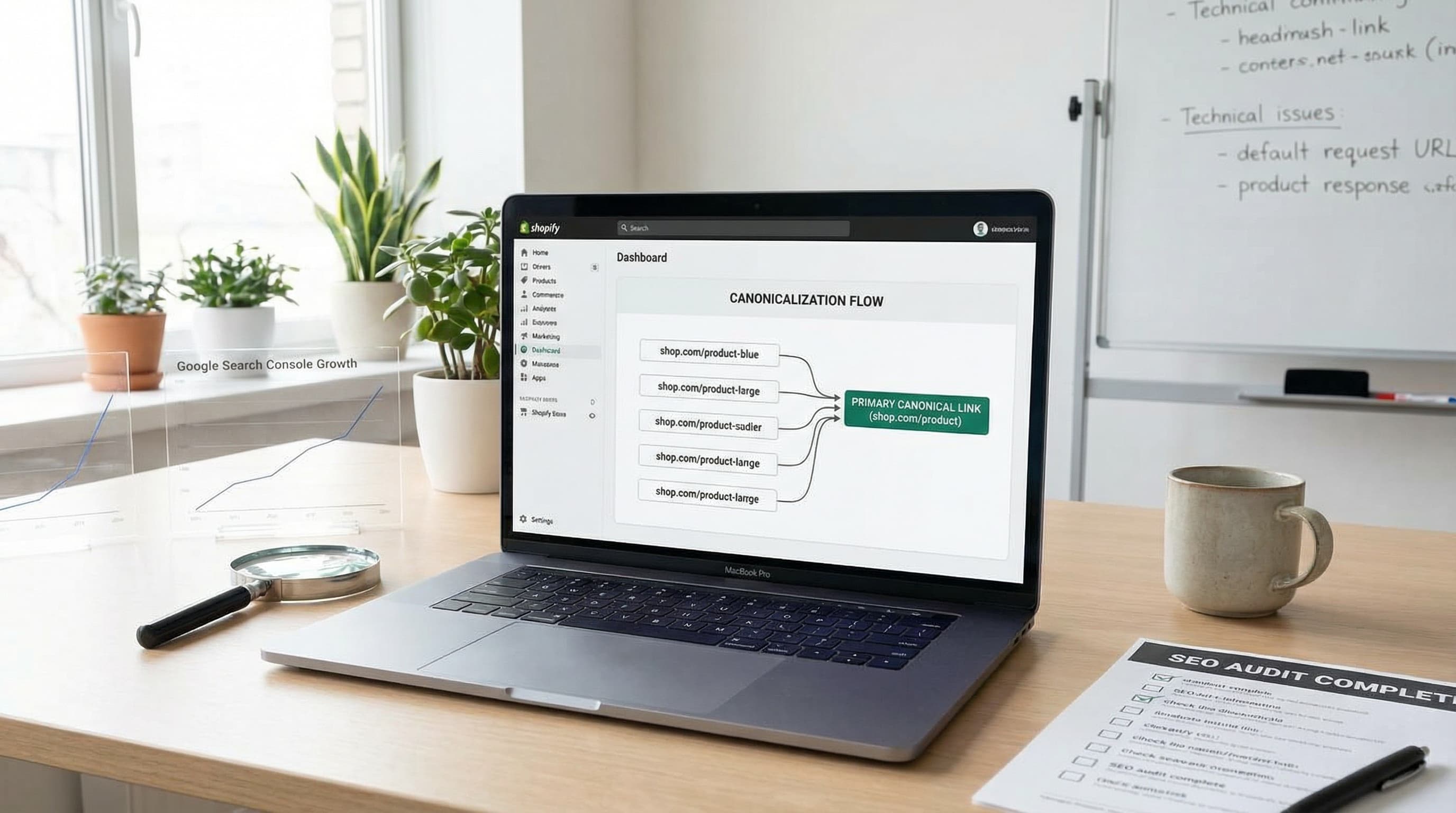
The canonical tag in Shopify is the first barrier to prevent the same product page from competing against itself in search results. in Shopify's native architecture, a single product can be accessed via its canonical URL (/products/handle) and multiple variants including collection handles, sort parameters, or tracking parameters (UTMs). In this diagnosis, we will explain how to detect these variants using Google Search Console and which signals to prioritize to protect crawl budget and ranking.
Key Concepts
To operate safely, let's define the technical elements involved in one line:
- Shopify: Ecommerce platform that manages the routes and templates where your catalog lives.
- Google Search Console (GSC): Essential tool to review indexation status and the real coverage of your URLs.
- Dawn: Official Shopify theme (OS 2.0) that serves as the standard for technical implementation.
- Canonical Tag: HTML element (
<link rel="canonical">) that indicates to search engines which is the preferred version of a page. - Crawl Budget: Finite resource Google assigns to crawl your site; wasting it on duplicates reduces the crawl frequency of important pages.
Why the product appears duplicated: the root of the problem
Understanding why duplicates occur is vital to decide whether to apply canonicalization, noindex, or redirects.
Shopify generates product routes, by default, in two main formats: the "clean" product URL (/products/product-name) and the contextualized URL within a collection (/collections/collection-name/products/product-name). Additionally, filter and search apps often add sort parameters (?sort_by=) or variants, while marketing campaigns add UTM parameters.
A typical error is assuming all these variants return the correct canonical tag pointing to the clean URL without manually checking. If the theme is not well configured, the URL with the collection might self-canonicalize, telling Google it is a distinct page and generating duplicate content.
How to detect duplicates in Search Console
Search Console shows coverage and performance by exact URL, allowing us to identify impression dispersion and misassigned canonicals.
To diagnose the current status:
- Use the Pages (Indexing) report and filter by product routes. Look for statuses like "Duplicate, Google chose different canonical than user" or "Excluded by 'noindex' tag" (if applicable) or "Duplicate without user-selected canonical".
- Export the data and group URLs by the product handle. This allows you to see all variants (with collection, with parameters) that Google has crawled for a single SKU.
- In the Performance report, filter by page to check if impressions and clicks are being split among several similar URLs, diluting authority.
Do not limit yourself to checking the sitemap; the sitemap is usually clean. The real problem lies in the URLs Google discovers through internal navigation and that appear in the performance report as alternate traffic sources.
Sources: Google's guide on consolidating duplicate URLs explains why canonicalization matters to avoid dispersing authority.
Priority warning signs
Detecting these signals allows prioritizing actions based on their impact on technical SEO:
- Collection variants: When a product appears in multiple collections (e.g., "New Arrivals" and "Shoes"), the URL changes. If both index, they compete against each other.
- Tracking and sort parameters: UTM parameters (
utm_source) and sort orders (sort_by) create infinitely multipliable variants. - Pagination and facets: If filter result pages are indexable without control, they can generate "near-duplicate" (thin content) that devours crawling.
A frequent mistake is relying on robots.txt to block parameters instead of correctly managing the canonical tag. Blocking prevents crawling, but does not solve indexing if the URL is already known or receives external links.
Impact on crawl budget and first operational steps
Every duplicate URL Google crawls consumes resources and fragments ranking signals. If you have 1,000 products accessible via 3 routes each, Google sees 3,000 potential pages.
To fix this, prioritize products with the highest traffic and those showing impressions split among variants.
Quick diagnostic checklist:
- Export product routes from Search Console and cross-reference them with your sitemap.
- Verify the real canonical tag of a sample using the "URL Inspection" tool in GSC (not just source code, but the rendered HTML).
- Prioritize the URL families to fix based on impression and click volume.
- Decide between canonical, noindex, or redirect based on the business case (see next section).
Decision Tree: canonical vs noindex vs 301 in catalog
In Shopify stores, it is common for a single product to be accessible from multiple URLs due to collection architecture and parameter usage. This decision tree will help you choose the correct strategy—canonical tag, meta robots noindex, or 301 redirect—to protect SEO without sacrificing traffic or conversions.
Technical Context:
- PIM (Product Information Management): Tool to manage centralized product information avoiding catalog inconsistencies before reaching Shopify.
- Shopify Metafields: Custom fields that allow saving additional data (such as specific indexing instructions) to improve SEO management.
TL;DR: The Golden Rule
- Use Canonical when the content is functionally the same and you want to consolidate ranking signals on the main URL.
- Use Noindex when the page provides little value to the search engine (excessive filters, internal search) but must remain available for user navigation.
- Use 301 when the old or alternative version must disappear permanently and you want to transfer its authority to a new URL.
1. Canonical to the main product URL
Why it matters: Prevents the dispersion of ranking signals (PageRank) when the same content appears on multiple URLs. It is the most common solution in Shopify.
How to approach it:
In Shopify, the product template (product.json or product.liquid) usually includes logic to generate the rel="canonical". You must confirm that this always points to the "clean" product URL (without collection route) and does not contain persistent parameters. Always review the rendered output with the URL inspection in Search Console.
- Example: If the main product is
store.com/products/sku-123and it is also accessible fromstore.com/collections/sale/products/sku-123, the canonical tag on both must be:<link rel="canonical" href="https://store.com/products/sku-123" />. - Typical error: Configuring the theme so the canonical points to the current URL (
self-referencing) on collection pages, validating the duplicate to Google.
2. Noindex for low-quality or paginated pages
Why it matters: Pages with very specific filter combinations or deep pagination often provide little semantic value and can generate index bloat.
How to approach it:
Add the <meta name="robots" content="noindex"> tag to irrelevant filter pages or internal search results that do not provide unique content. It is vital to keep them accessible to users (without blocking via robots.txt) and preserve internal links, but telling Google not to include them in the index.
- Example: For page 2 of a collection (
store.com/collections/category?page=2), add noindex. - Typical error: Applying noindex to the entire main collection by mistake, deindexing the whole category instead of just paginated or filtered pages.
3. 301 Redirect for discontinued products
Why it matters: When a product ceases to exist, returning a 404 error loses accumulated authority. If there is a commercial replacement, the 301 transfers that relevance.
How to approach it: Implement a 301 redirect from the old URL to the new equivalent option in Shopify, using the native "Redirects" section (Online Store > Navigation > URL Redirects). Avoid mass redirecting to the homepage (Soft 404 for Google) if there is no logical substitute.
- Example: Product A discontinued -> 301 -> Product B (new or similar version).
- Typical error: Redirecting to the home page, frustrating the user and losing the relevance of the specific search intent.
4. Management of UTM parameters and filters
Why it matters: UTM parameters should not create indexable versions. If Google indexes product?utm_source=facebook, you are competing with yourself.
How to approach it: Configure your theme so that UTM parameters do not alter the canonical tag. This must remain static pointing to the clean URL. For filters that alter content (e.g., "Color: Red"), consider using canonical to the main category if the content is nearly identical, or allow indexing (self-referencing canonical) only if there are specific searches for that variant and the content changes substantially.
- Example: A marketing campaign adds UTMs to the URL; the canonical still points to
store.com/products/sku. - Typical error: Dynamic canonical that includes UTM parameters in its value.
Validation Checklist (Search Console + Dawn)
- Check coverage: Filter in GSC by "Duplicate URLs" to find pages correctly excluded by canonical.
- URL Inspection: Check the
rel="canonical"tag in the rendered version (not just source code). - Test in Dawn: Duplicate a product in a collection, navigate to the long URL (
/collections/.../products/...) and verify the HTML header. - Validate redirects: Use a tool like
httpstatus.ioto confirm redirects return code 301 and the correctlocationheader. - Monitoring: Watch impressions and clicks for 14 days after changes to detect unexpected drops.
Implementation in Shopify (Dawn) and operational checklist
Once the strategy is clear, we move to execution. Correct implementation of the canonical tag in themes like Dawn is critical to prevent the same product from indexing in multiple routes. Below we detail how to implement it without touching external hosting, how to validate the change, and what to monitor.
When to use canonical in Shopify (Operational summary)
The quick decision before touching code:
- Same product, different prefix: If only the route changes (
/collections/vs/products/) or there are parameters, apply canonical to the/products/slugroute. - Distinct editorial content: If the page has unique content that adds SEO value, consider keeping it indexable (self-referencing canonical).
- Obsolete URL: If the old URL should not exist, use 301.
Example: If /collections/shoes/products/nike-air and /products/nike-air show the same content, the canonical for both must be /products/nike-air.
Implementation in Dawn: what to touch
In the Dawn theme, the canonical tag is usually generated dynamically in the main layout (theme.liquid). Finding it and ensuring its logic avoids most duplicates.
How to approach it:
- Open the theme code editor (Online Store > Themes > Edit code).
- Locate the
theme.liquidfile. - Search for the
<link rel="canonical">tag. Verify that the generated value uses the variable representing the object's canonical URL (usuallycanonical_urlin Liquid, but ensure that for products it forces the/products/route). - If the logic points to the current URL (
current_url) instead of the object's canonical, modify it to prioritize the product's base URL.
Typical error: Accidentally deleting the canonical tag or leaving it dynamically pointing to the collection the user is navigating.
Local tests and deployment
Never edit the live theme without testing.
How to approach it:
Use the "Preview" function of the duplicated theme. Navigate to a product URL with a collection (/collections/name/products/name). Open the source code view (Ctrl+U) or inspect the <head> element. Look for link rel="canonical".
You should see: <link rel="canonical" href="https://yourdomain.com/products/product-name">.
If you see the route with /collections/ in the href, the configuration is incorrect.
Validation and monitoring checklist (14 days)
Search Console does not react instantly. You need a follow-up plan.
- Initial Snapshot: Inspect a sample of 5-10 problematic URLs before the change and note their status in GSC.
- Post-deploy Validation: After publishing the theme, use the "URL Inspection" tool on those same URLs. Request indexing if the detected canonical has not changed.
- Monitoring:
- Day 3: Check if GSC starts reporting "Excluded: Alternate page with proper canonical tag" for collection variants.
- Day 14: Review the Performance report. You should see a consolidation of impressions on canonical URLs and a decrease in duplicates.
Audit scaling and automation
For large catalogs, manual review does not scale.
How to approach it:
- Prioritization: Attack top-selling products and those with coverage errors in GSC first.
- Automation: Configure a crawler (like Screaming Frog) to crawl your site and extract the
canonicalfield of each page. Filter those where the canonical does not match the business rule (e.g., canonicals containing/collections/). - Reporting: Create tickets for the development or catalog management team if you detect inconsistencies in metadata.
To deepen technical best practices, resources like Listing Forge or the Shopify SEO documentation offer additional guides.
Quick FAQ
- What about tracking parameters? Keep the canonical pointing to the clean route. Configure GSC or your analytics tool, but the canonical is the main defense.
- Should I canonicalize pagination to page 1? No. Page 2 is not equal to page 1. Use
rel="prev/next"(although Google no longer uses it for ranking, it helps discovery) or allow them to be indexed if they have unique products, or use noindex if you prefer to prioritize crawl budget on categories and products. Generally, canonicalizing page 2 to page 1 is a mistake (soft 404).
Contextual Solution: Automating Catalog Quality
Manually managing canonical tags, metafields, and content consistency across thousands of SKUs is a task prone to human error that consumes hours of technical and marketing team time. Detecting when a product has lost its SEO alignment or when a collection is generating thousands of duplicates requires constant monitoring.
ButterflAI detects inconsistencies in your catalog structure and optimizes your product content to ensure every listing works in favor of your positioning, not against it. Our platform centralizes the optimization of titles, descriptions, and metadata, allowing you to scale listing quality corrections without depending on manual theme developments for every content change.
Related resources
Go deeper with guides and tools connected to this topic.
FAQs
Quick answers to common questions.
