Catalog Preparation in Shopify: Data Quality from the Source
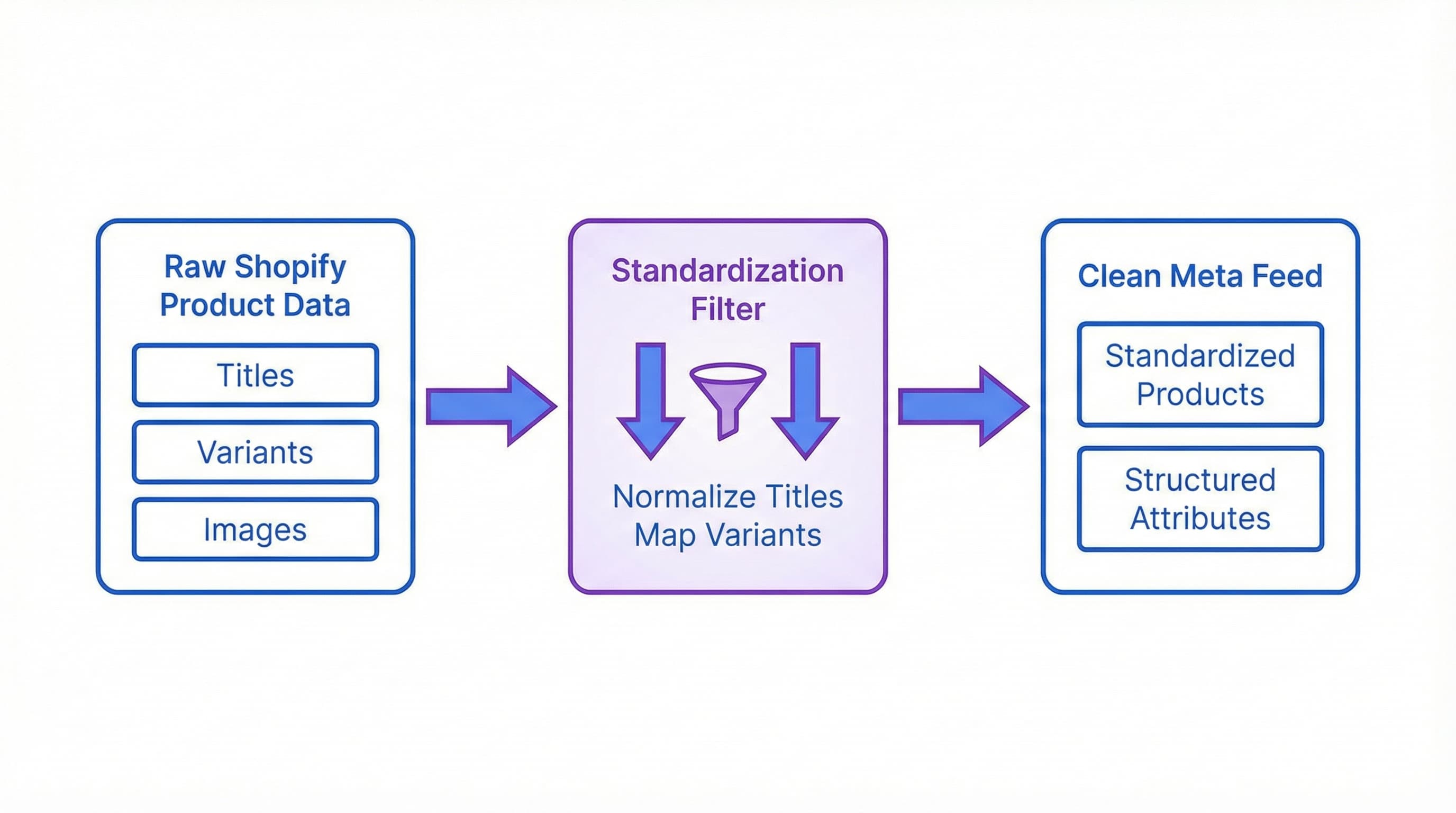
Feed quality determines how long it takes for the catalog to be published and how many products are rejected by Meta Commerce Manager. Preparing the catalog in Shopify involves normalizing titles, mapping variants, and using metafields for attributes that Meta requires or prioritizes. A consistent source reduces errors related to price, availability, missing attributes, and problematic images.
Before connecting with Meta, it is fundamental to carry out a series of key steps in Shopify: standardize titles and descriptions, unify color and size values, define the relationship between parent SKUs and variants, fill in metafields for color, gender, and material, and validate images and prices. Always review a sample before syncing the entire catalog.
Before diving in, let's define some brief concepts that matter:
- Shopify Metafields: System for storing custom product and variant attributes. It matters because it allows you to save standardized values that Meta expects.
- PIM: Platform to centralize and normalize product data.
- Feed: File that shares products with Meta.
- Schema: Structure and field names required by the platform.
Preparing Titles and Descriptions for a Consistent Feed
Why this step matters
Inconsistent titles and descriptions generate rejections, worsen ad performance, and decrease relevance in internal searches.
How to approach it
Define clear templates for titles and descriptions that include brand, model or style, key attribute, and measurement. Normalize units and avoid commercial text in the title. Implement transformation rules in Shopify or your PIM to apply templates in bulk.
Example
Title template: Brand + Model + Key Attribute + Measurement.
Resulting text: BrandX T-Shirt Classic Blue Size M.
Typical error
Leaving promotional terms in the title such as "sale", "free shipping", or "best seller".
Mapping Variants and Relating them to a Parent SKU
Why this step matters
Meta may interpret variants as separate products if they are not well related, producing duplicates and rejections in the catalog.
How to approach it
Group variants that share a design under a Parent SKU. In Shopify, use the parent product as the commercial unit and the combinations as variants with child SKUs. If you manage inventory by combination, keep individual SKUs but mark the style identifier in a standardized field (item_group_id).
Example
A dress with colors and sizes:
- Parent SKU: DRESS123
- Variants: DRESS123-WH-M, DRESS123-WH-L, DRESS123-RE-M.
Typical error
Publishing each combination as an independent product without a parent-child relationship, fragmenting pixel data and reviews.
Using Metafields for Color, Gender, and Material
Why this step matters
Meta requires standardized values for certain attributes, and a metafield guarantees that the source has those values controlled and separated from the general description.
How to approach it
Create metafields for color, gender, and material with controlled vocabularies. In Shopify, define the appropriate data type (text, reference, etc.) and fill them in bulk via CSV or API. Maintain a mapping between your internal values and those accepted by Meta.
Example
- Color metafield with normalized values: blue, black, white.
- Gender metafield: male, female, unisex.
Typical error
Using free synonyms like "dark midnight blue" instead of the normalized value "blue" expected by the algorithm.
Images and Priority Order
Why this step matters
Inappropriate images cause immediate rejections and drastically lower conversion in dynamic ads.
How to approach it
Ensure the main image shows the product on a neutral background with adequate minimum resolution (generally 1080x1080). Add an image per variant if the appearance changes by color. Fill the alt text with SKU and avoid watermarks or promotional text.
Example
Main image of 1200 x 1200 pixels for fashion and additional photos with close-ups of the fabric.
Typical error
Using images with large logos, borders, watermarks, or embedded promotional text ("Sale").
Quick Validation Checklist Before Syncing
Why this step matters
A simple validation reduces the appearance of typical errors in Meta Commerce Manager before they occur.
How to approach it
Perform a minimal checklist:
- Unique SKU and defined parent.
- Title template applied.
- Color, gender, and material metafields completed.
- Consistent price and availability.
- Valid image.
Export a sample of 100 products and validate with Meta's diagnostic tool.
Example
Spreadsheet with pass/fail columns per product for each check.
Typical error
Syncing the entire catalog at once without validating a controlled sample, saturating the error log.
Sources and Next Steps
Consult the official Shopify documentation on metafields and products at Shopify Help and catalog requirements at Meta Business Help to confirm fields and formats before connecting.
FAQs for this phase:
- How to correct hundreds of products? Prioritize top sellers and repeated errors. Apply automatic rules and bulk processes from Shopify or in your PIM.
- What to do if Meta rejects due to price? Verify currency, taxes, and price rules between parent SKU and variants before retrying synchronization.
- Operational next steps: Prepare a rollout plan by batches of 100 to 500 products, control the first synchronization in Meta, and document the most frequent errors to automate future corrections.
Step-by-Step Configuration in Meta Commerce Manager
Once the data in Shopify is clean and structured, the next step is the technical connection. The goal is to choose the right connection method, map fields and variants accurately, and apply a configuration that minimizes friction between platforms.
How to Connect the Catalog and Choose Connection Method
Choosing the right method is critical because it determines control and update latency. The App option (Facebook channel in Shopify) automatically syncs products and variants from Shopify; the Data Feed method (CSV file or scheduled XML feed) requires generating and maintaining an external feed.
The Facebook app in Shopify is the simplest option for stores with a centralized catalog and frequent stock updates. The feed is preferable when prior transformation, complex business rules, or managing multiple catalogs from a PIM is needed. Always check the official documentation for restrictions and permissions in Shopify Facebook Guide and Meta Commerce Manager Help.
Brief Example
If you sell clothing with sizes and colors managed as native variants in Shopify, use the app so that stock and price updates are reflected in real-time.
Typical error: Choosing manual feed via CSV and forgetting to sync it daily, causing sales of out-of-stock products.
Linking the Facebook App from Shopify
Why this step matters
A poorly authorized connection generates inventory discrepancies and permissions that block ad publication.
How to approach it
Install and configure the Facebook sales channel from Shopify, connect the Facebook Business account and the corresponding page, and select the destination catalog in Meta Commerce Manager. Confirm that the catalog's currency and country match your Shopify store. Note that the app creates default mappings but sometimes does not cover complex custom metafields automatically.
Brief Example
Step: In Shopify install the Facebook channel, authorize the Business account, and select the pre-existing catalog or create a new one.
Typical error: Not using the same Business account or page that manages the ad account, resulting in insufficient permissions.
Mapping Basic Fields and Why They Matter
Context
Incoherent mapping between title, description, price, availability, and link causes fatal errors and rejected listings.
How to approach it
Review Meta's mandatory fields: id, title, description, availability, condition, price, link, image link, and GTIN/MPN where applicable. If using Shopify, verify that each product and variant has a unique SKU and price greater than zero. If your catalog comes from a PIM or custom feed, normalize names and units before sending.
Brief Example
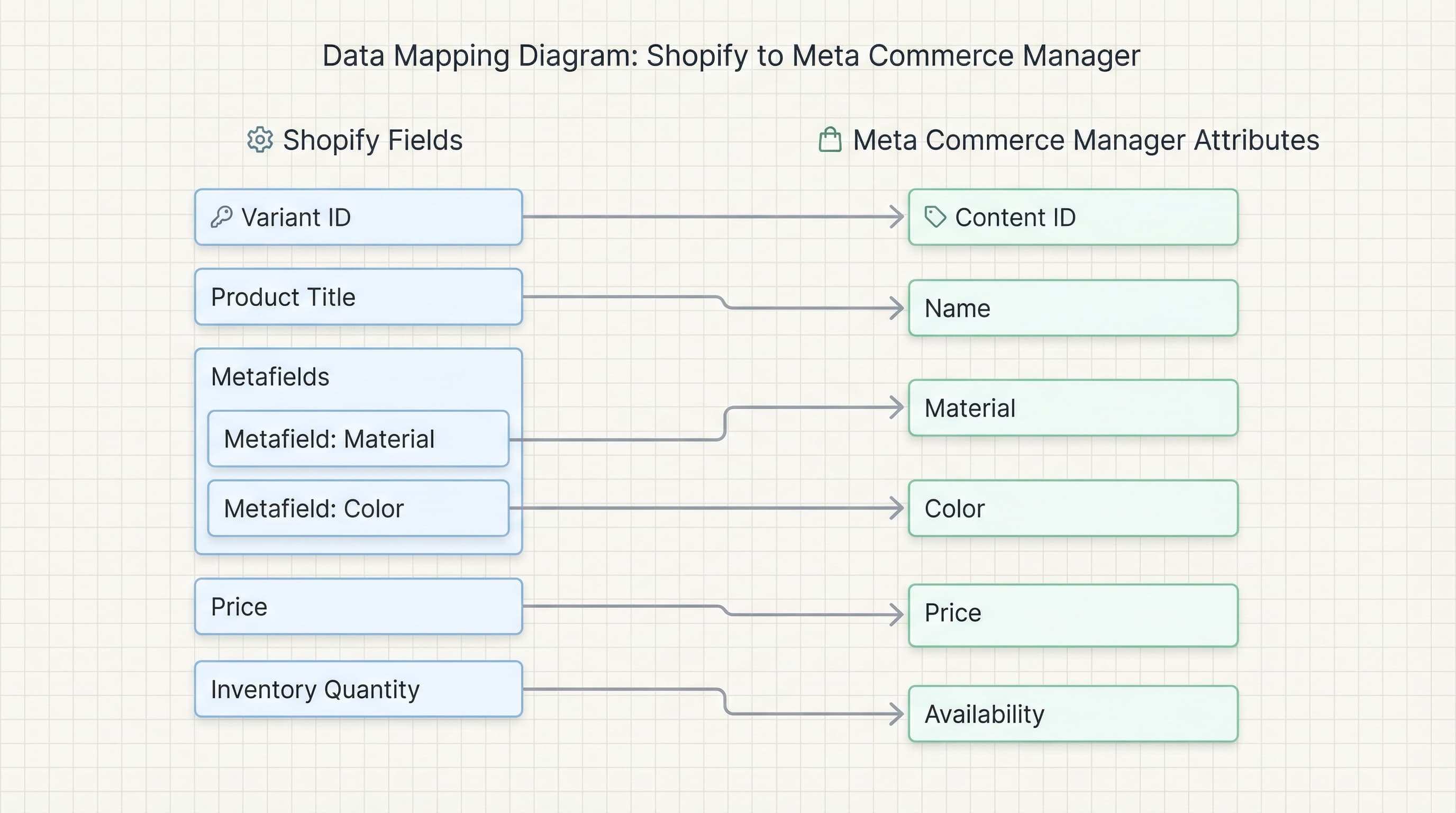
Correct Map:
- Shopify variant ID -> Catalog ID
- Variant title -> Title
- Variant price -> Price
- Image SRC -> Image Link
Typical error: Sending price without format or with extra symbols that Meta interprets as non-numeric text.
Variants and Metafields (What They Are and Why They Matter)
Context
Variants define combinations (size, color) and metafields allow for custom fields necessary for advanced mappings (filter by material, fit, etc.).
How to approach it
In Shopify, use variants for options that directly affect inventory and price. Use metafields for attributes that Meta does not extract by default like material, composition, or technical attributes. Define a consistent and documented metafield schema. If the native app does not map a specific metafield, consider creating a supplementary feed or using a feed app that includes those fields.
Brief Example
Metafield material: "100% cotton".
Typical error: Saving attributes in the description in plain text instead of metafields, making extraction and filtering in Instagram Shopping difficult.
Quick Validation and Rejection Diagnosis Checklist
Context
An operational checklist reduces diagnosis time and allows for quickly resolving recurrent rejections in Meta Commerce Manager.
How to approach it
Minimum post-connection checks:
- Unique SKU per variant.
- Positive prices.
- Consistent availability between Shopify and catalog.
- Images with public URLs and adequate dimensions.
- GTIN/MPN present when required.
Review Commerce Manager errors; Meta usually indicates the specific field and reason. For complex cases, export the feed and compare problematic columns with filters.
Brief Example
Diagnosis: Commerce Manager flags "price mismatch" error; review currency format in Shopify and catalog settings.
Typical error: Images returning 404 due to CDN blocking or private file permissions in Shopify.
Quick FAQs
- Why use feed instead of app? When you need transformations, complex exclusion rules, or to combine multiple data sources.
- Where to see errors? In Meta Commerce Manager > Catalog > Diagnostics.
- Useful tools: Use a PIM or ETL tool to normalize data before the push to the feed.
Quality Checklist and Troubleshooting: Maintaining a Healthy Feed
Once configured, the work doesn't end. A clean feed in Meta Commerce Manager reduces rejections and improves Facebook and Instagram Shopping performance in the long run. This section is an operational guide to audit batches from Shopify, diagnose typical rejections, and apply quick fixes.
Initial Catalog Audit
Why this step matters
A first sweep detects massive problems that generate cascading rejections and loss of visibility in campaigns.
How to approach it
Export the feed from Shopify or your feed generator and review the mandatory columns: id, title, description, link, image link, price, availability, condition, and gtin or sku. Compare a sample with the public view of the product in Shopify to validate consistency.
Brief Example
In the spreadsheet, filter rows where price is empty or availability does not match real inventory.
Typical error
Not checking variants without SKUs that remain without price or identifier, left in limbo.
Price and Availability Validation
Why this step matters
Incorrect price or availability causes automatic blocks due to misleading commerce policies and customer complaints.
How to approach it
Ensure the price field uses the correct local currency format and matches exactly the price shown at checkout. Review tax rules, rounding, and currency conversion if you sell in multiple markets. Sync Shopify's inventory system with any PIM or ERP frequently.
Brief Example
Detect price equal to 0 or empty and mark the item to pause until corrected.
Typical error
Sending price higher than sale price without explicitly indicating the sale price creates conflicts and rejection.
Images and Visual Requirements
Why this step matters
Rejected images prevent publication and reduce ad conversion.
How to approach it
Verify that image link is publicly accessible and that images meet minimum resolution and accepted format. Avoid watermarks and ensure that each relevant variant has its own specific image. Use URLs that return a 200 OK code and not 403 or 404.
Brief Example
A "Red T-Shirt" variant must have an image of the red t-shirt in image link, not the generic model photo.
Typical error
Hosting images in private paths or password-protected areas that return a 403 error to the Meta crawler.
Variant Mapping and Metafield Usage
Why this step matters
Poorly mapped variants generate duplicates or incomplete listings (without selectable size/color) in Meta.
How to approach it
Define a unique ID per variant and use metafields to send key attributes like size, color, or material. Metafields allow enriching the feed without breaking Shopify's visual structure. Configure mapping in the Meta sales app or your feed generator to maintain a stable ID per variant.
Brief Example
Export Shopify variant id 12345 as item id and map color from metafield namespace.
Typical error
Sending the same ID for the parent product and all its variants, causing duplicates and matching errors.
Quick Checklist Before Upload
Why this step matters
A final control avoids reprocessing and saves operational debugging time.
How to approach it
Check these key points before upload or resync:
- Unique ID per row.
- Clear title without invalid characters.
- Price with correct currency and decimals.
- Availability consistent with inventory.
- Image link accessible and valid product URL.
- GTIN or SKU when required.
Brief Example
Create a filter in Excel that shows rows with empty mandatory columns for immediate correction.
Typical error
Not validating that the product URL will not return a 404 error (page not found).
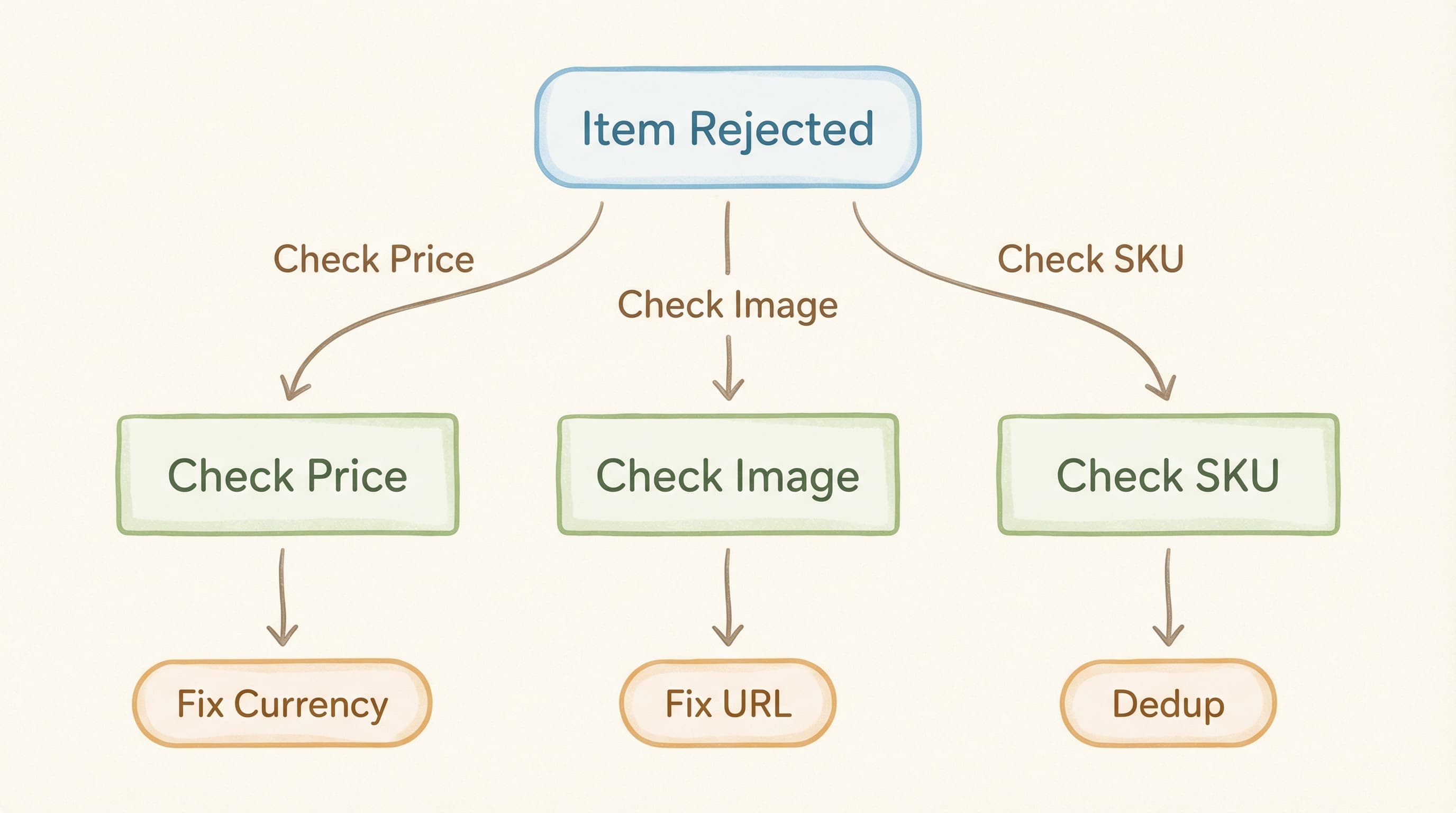
Quick Troubleshooting Flow for Frequent Errors
Why this step matters
A standard process reduces average resolution time and minimizes impact on active sales.
How to approach it
- Identify the error code in Commerce Manager.
- Locate the implicated field in the exported feed.
- Correct in Shopify or in the PIM and re-export or re-index.
- Force item resend or request re-evaluation in Commerce Manager.
Brief Example
Price error: review price column and tax settings in Shopify, correct, and manually resend the item if urgent.
Typical error
Not forcing re-indexing after correcting the feed and waiting for automatic changes that can take up to 24 hours.
Preventive Maintenance and Alerts
Automate nightly validations that check mandatory fields and image accessibility. Implement alerts via email or Slack when the error ratio exceeds a defined threshold (e.g., >5%) to act proactively before it affects your campaigns.
Clean and Automatically Enriched Data
Maintaining consistency between Shopify and Meta Commerce Manager often requires hours of manual spreadsheet review and correction of empty attributes. ButterflAI automatically detects inconsistencies in your catalog, fills missing metafields based on the product image or description, and optimizes titles to meet Meta standards without manual intervention. This ensures a healthy feed and drastically reduces the rejection rate in your sales channels.
Fuentes