
Catalog & Data Management
Google Shopping Feed Optimization: The QA Scorecard
A practical QA scorecard and weekly workflow to prevent Merchant Center disapprovals, optimize your product data, and scale catalog growth.
Mar 4, 2026
Read More
Master your product data model, centralize attributes, and eliminate CSV chaos with an effective eCommerce PIM strategy.

If your team manages catalogs between Shopify and spreadsheets, you are likely wasting time fixing errors and re-syncing data. A PIM (Product Information Management) centralizes attributes, versions, and content to create a single source of truth. It serves to govern how product data is stored and distributed. It matters because it reduces operational errors and accelerates launches.
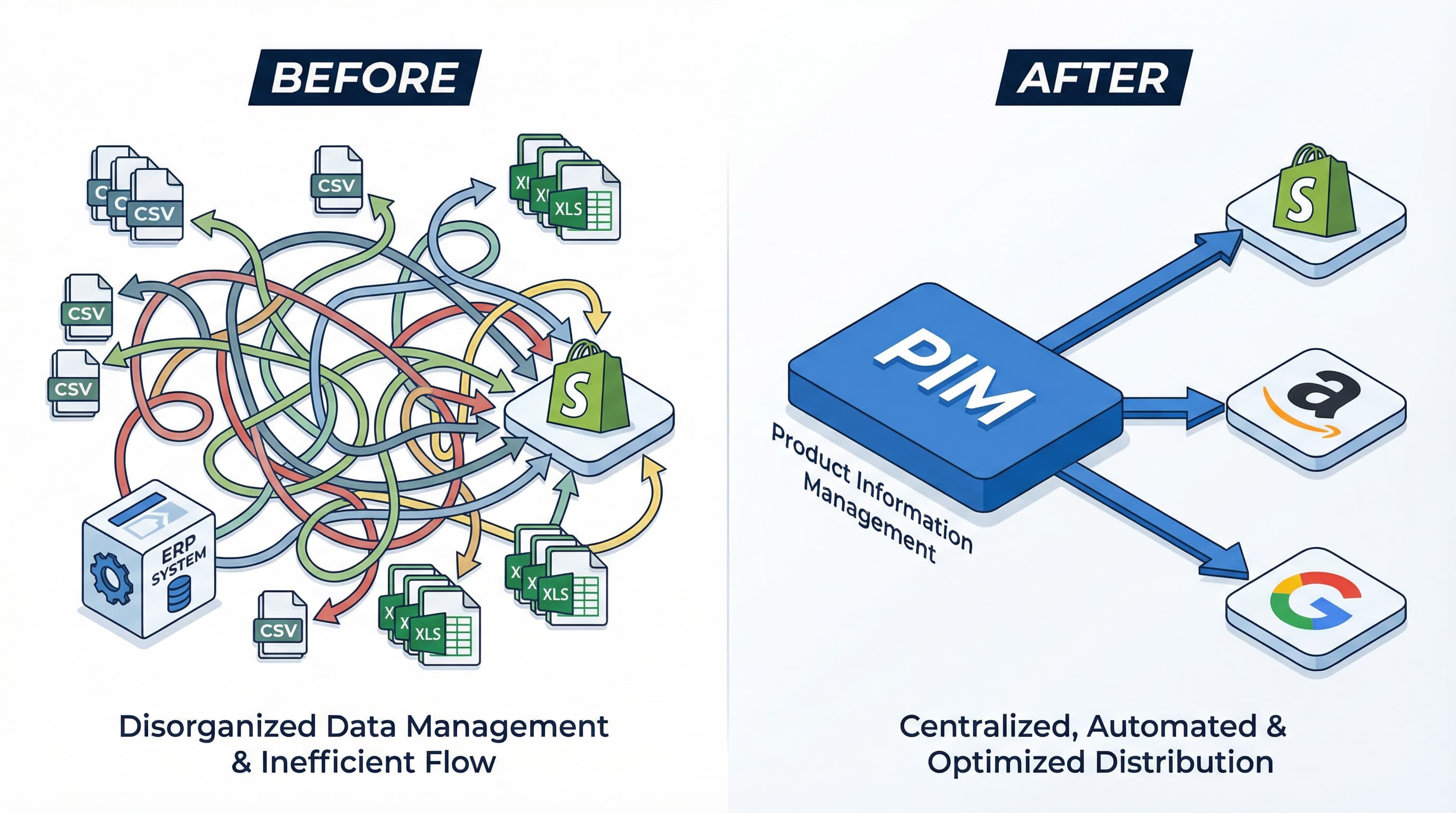
Context: Customers expect consistency between your store, marketplaces, and comparison sites. Approach: Centralize attributes in a source of truth and define publication rules per channel. Configure versions by market and content templates for each touchpoint. Example: The color or commercial name appears differently on the web and a marketplace; with a PIM, you define the master attribute "color" and mappings per channel. Typical Error: Updating only the spreadsheet without propagating changes to all endpoints.
Context: Marketplaces and advertising tools reject feeds with missing data or incorrect formatting. A feed is a structured file containing mandatory fields per channel used to synchronize catalogs. Approach: Validate and normalize mandatory fields in the PIM before exporting. Example: A Google Merchant feed rejected due to missing GTIN or size is corrected in the PIM and automatically re-exported. Typical Error: Generating feeds directly from CSV without prior validation rules.
Context: Manual processes generate parallel versions and waste time. Approach: Replace manual uploads with integrations and synchronizers. Plan the migration from sheets to a data model in the PIM and automate synchronization with Shopify via APIs. Example: Instead of uploading a CSV with 20 columns per category, import the master data to the PIM and synchronize only the necessary metafields to Shopify. Typical Error: Maintaining multiple CSVs with unreconciled changes between teams (Marketing vs. Logistics).
Context: Without a clear taxonomy, variant combinations explode in number and errors. Approach: Design a model that distinguishes technical, commercial, and marketing attributes, and document variant composition rules. Example: Defining that "size" and "color" are variant attributes, while "material" is a master attribute, avoids duplicate listings. Typical Error: Saving variant attributes in free text fields or in the product title.
Context: Without owners or workflows, quality drops and no one fixes recurring problems. Approach: Define roles, SLAs, and automatic validation rules. PIMs usually offer approval workflows and change traceability. Example: Creating a flow where the editor proposes changes, the reviewer validates critical attributes, and the manager publishes avoids errors in production. Typical Error: Not recording who modified what and when, losing error traceability.
Preparing reduces risks and accelerates return on investment. Execute these steps before implementation to avoid rework and facilitate adoption.
Technical Checklist
Operational Checklist

Designing the "Golden Record" is the step that transforms a scattered catalog into a single source of truth for all channels. In teams using an eCommerce PIM and Shopify, this prevents massive CSV re-sends and quality loss when publishing variants and attributes. A well-designed data model facilitates omnichannel operations, metafield management, and feed automation.
The Golden Record centralizes canonical attributes per product and controls versions and data origin. A PIM is the platform to store and publish these attributes in a structured way; it matters because it allows governing attributes, translations, and assets from a single point.
Why it matters: Taxonomy organizes the catalog into families and types, reducing ambiguities when there are hundreds or thousands of SKUs. How to approach it: Inventory current columns in CSVs and sheets and group products into families that share mandatory attributes. For each family, define mandatory, optional, and channel-specific attributes, and register the data type: short text, decimal, boolean, or controlled list. Example: Footwear Family: size, color, material, gender, EAN code. "Size" attribute as a controlled list with values 38, 39, 40, 41. Typical Error: Creating overly general families that mix incompatible attributes.
Why it matters: Inconsistent values break filters and feeds in stores and marketplaces. How to approach it: Create canonical dictionaries for color, material, and size. Assign normalized identifiers to each value and maintain mappings to presentation variants per channel. Implement automated transformations in the PIM to fix capitalization, separators, and number formats. For global codes like EAN, review GS1 standards. Example: Canonical color "Navy Blue" (ID 1001). Historically appears as "navy", "blue", and "navy blue". Map all entries to ID 1001. Typical Error: Allowing free values in key filters without prior validation.
Why it matters: A poorly thought-out variant model complicates inventory and publication in Shopify, which expects variant groups defined by specific options. How to approach it: Decide between a parent-child model or master SKU with child SKUs. In the PIM, maintain a unique identifier per variant and the attributes that define the combination. Generate rules for SKUs that include family, variant attribute, and channel suffix when necessary. Example: Parent SKU 12345 with Child SKUs 12345-S-R, 12345-M-B, where S/M are sizes and R/B are colors. Typical Error: Creating manual SKUs without rules, causing duplicates and conflicts with marketplaces.
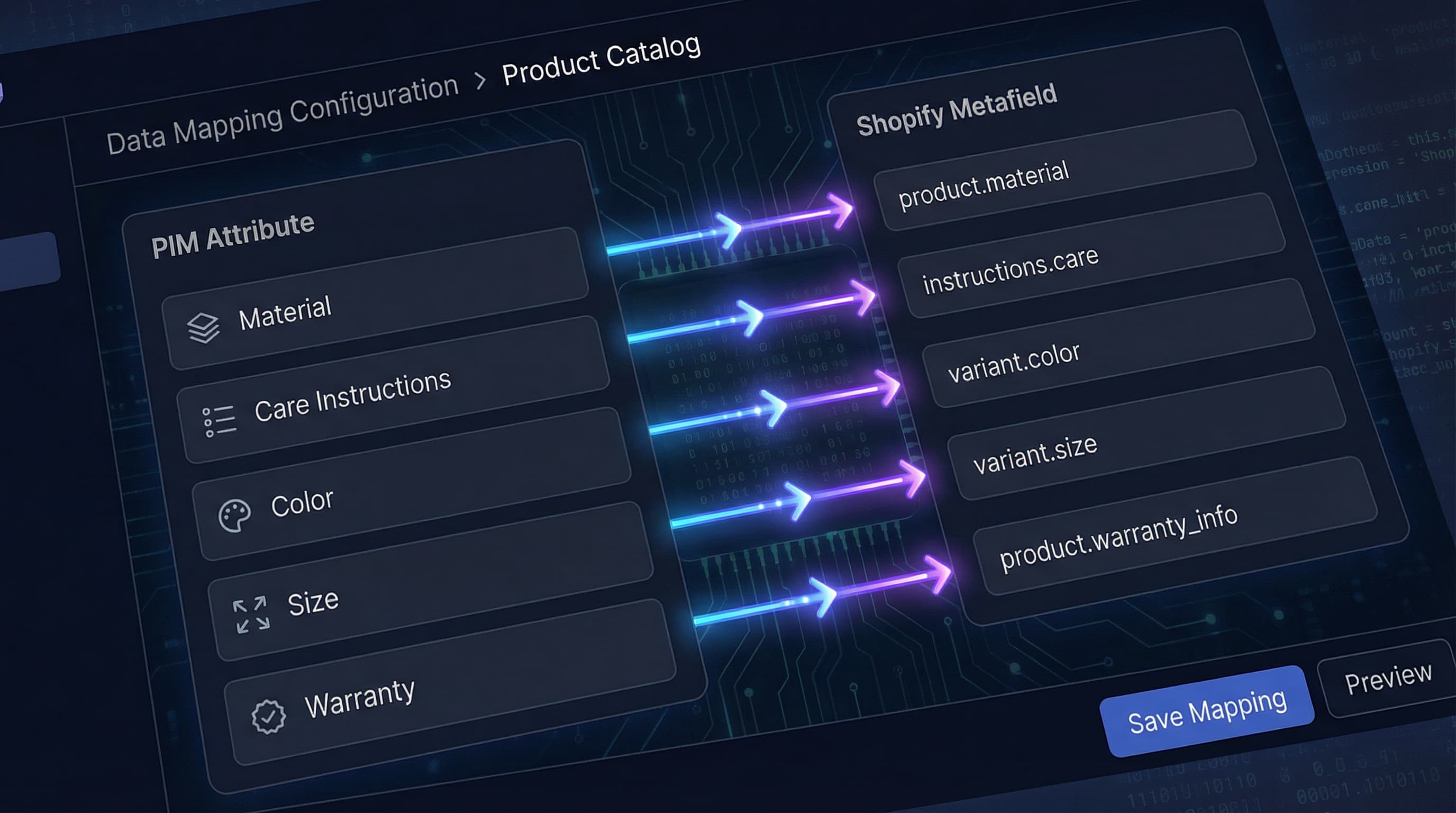
Why it matters: Shopify has standard fields like title, description, price and supports Metafields for extended attributes. Deterministic mapping prevents data loss during synchronization.
How to approach it: First map canonical PIM attributes to standard Shopify fields. For extended attributes, define Metafield namespaces and keys following a consistent convention and document the required data type by Shopify for each metafield. Use an integration app or feed that validates types and lengths.
Example: PIM attribute material -> Shopify metafield namespace product.material, type single_line_text.
Typical Error: Publishing lists or complex objects into a plain text metafield without respecting the JSON schema or expected format.
Why it matters: Without governance rules, the Golden Record degrades and CSVs reintroduce errors over time. How to approach it: Establish an owner per family, automated validations in the PIM, and checks in the publication pipeline. Implement change logs, rollback, and a post-publication discrepancy monitor. Define deployment rules to Shopify and managed exceptions. Example: Business rule: price changes only allowed via authorized ERP integration, with strict version control. Typical Error: Not auditing changes and relying on manual CSV imports without review.
This roadmap explains how to implement an eCommerce PIM to scale a catalog on Shopify without losing data quality. It is designed for teams operating between Shopify and CSV/Sheets with the goal of leaving a reproducible operation in one month.
Key concepts:
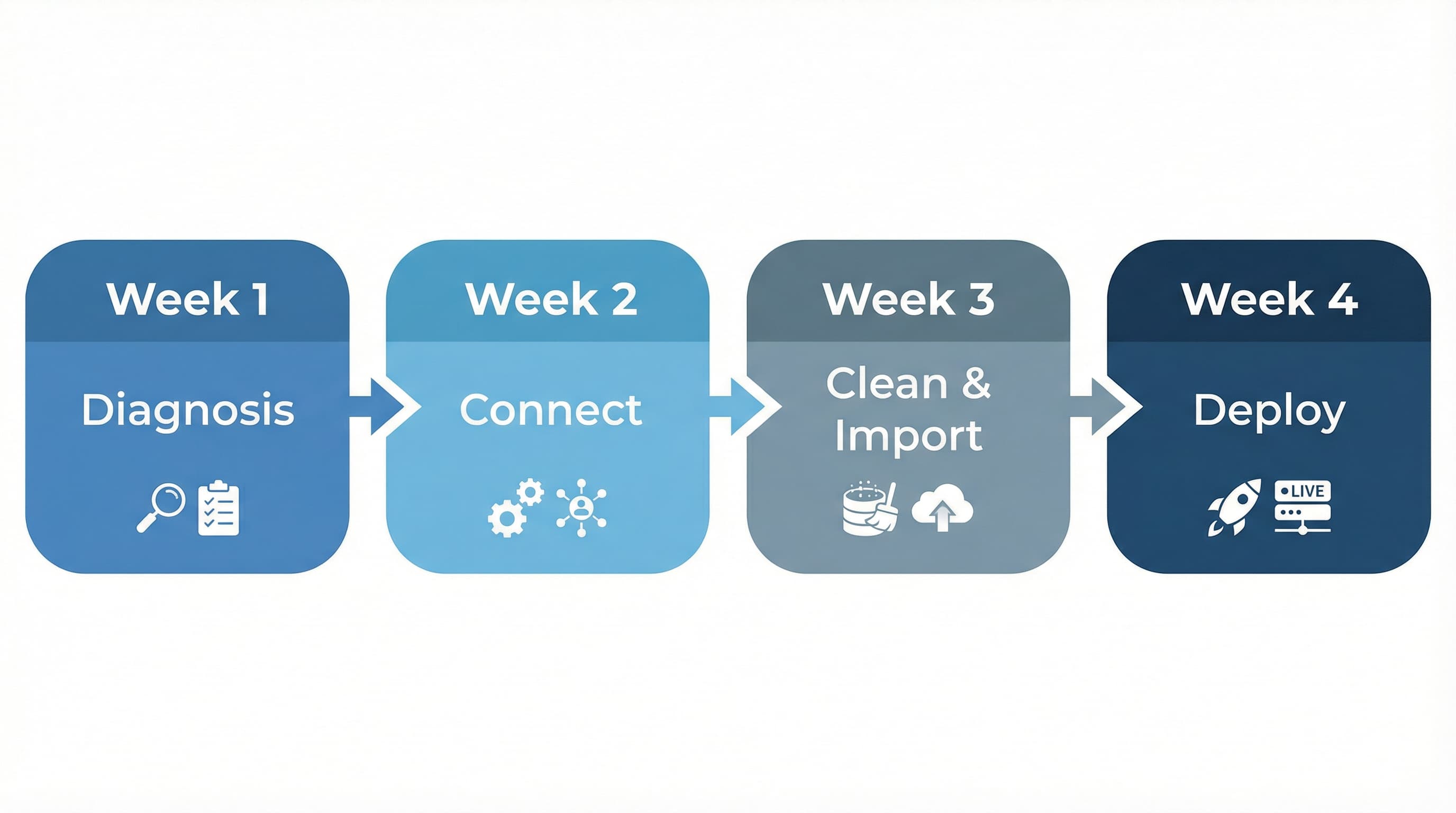
Context: A clear data model prevents duplication and errors that replicate in feeds. Approach: Audit 100 representative SKUs and classify attributes into mandatory, conditional, and repeatable. Define taxonomy and variant schema. Document which fields will go to Shopify as metafields and which will live only in the PIM or feeds. Prioritize attributes that impact conversion and normalize vendor nomenclature. Example: Map "size" as a conditioning attribute for apparel and "color" as a visual variant. Typical Error: Creating ad hoc attributes from operations without validating their impact on frontend templates.
Context: Choosing the right PIM and connector reduces friction in daily synchronization.
Approach: Consider a lightweight PIM if the catalog is small or a specialized one (like Akeneo or similar) for thousands of SKUs. Configure attributes according to the model and create the connector that maps fields to metafields in Shopify. Test with a subset of SKUs and validate interpretation in theme templates.
Example: Configure attribute material in PIM and map it to metafield namespace product_specs.material.
Typical Error: Not versioning mapping templates and losing traceability for future changes.
Context: Migrating data without cleaning reproduces historical failures in the new system. Approach: Clean CSVs and Sheets before importing. Implement automatic validation rules for mandatory attributes and human tasks to resolve failures. Design an onboarding workflow with stages: draft, SEO review, image approval, and publication. Automate role assignment. Example: Automatic rule that blocks publication if high-resolution images are missing or if the GTIN is invalid. Typical Error: Allowing direct publications from "draft" status without passing through QA.
Context: The last mile is operational and requires real adoption by the team. Approach: Plan a deployment window to synchronize the full catalog and update templates in Shopify. Perform a rollout in a staging environment, validate with stakeholders, and promote to production. Document runbooks and enrichment SLAs. Train catalog and support teams on the new workflow. Example: Controlled rollout in staging with a visual validation checklist of metafields on the PDP (Product Detail Page). Typical Error: Not communicating changes to marketing and operations teams that depend on old fields.
Implementation does not end on day 30. To maintain quality:
Implementing a PIM solves data structure and governance, but filling it with quality content remains a manual and slow challenge. ButterflAI automatically detects gaps in your product information and generates titles, descriptions, attributes, and metafields optimized for SEO and conversion, integrating directly into your workflow to ensure your "Golden Record" is always complete and up to date.
Go deeper with guides and tools connected to this topic.
Quick answers to common questions.
A practical QA scorecard and weekly workflow to prevent Merchant Center disapprovals, optimize your product data, and scale catalog growth.
Mar 4, 2026

Discover how to measure data quality in your ecommerce catalog using the 6 core dimensions, channel-specific scorecards, and continuous remediation loops.
Feb 26, 2026

Stop guessing with basic Etsy SEO tips. Map your catalog data to Etsy attributes, automate descriptions, and scale your listing optimization strategy systematically.
Feb 25, 2026
